Few Juicy Points
• Generated on the shader (no external textures or files)
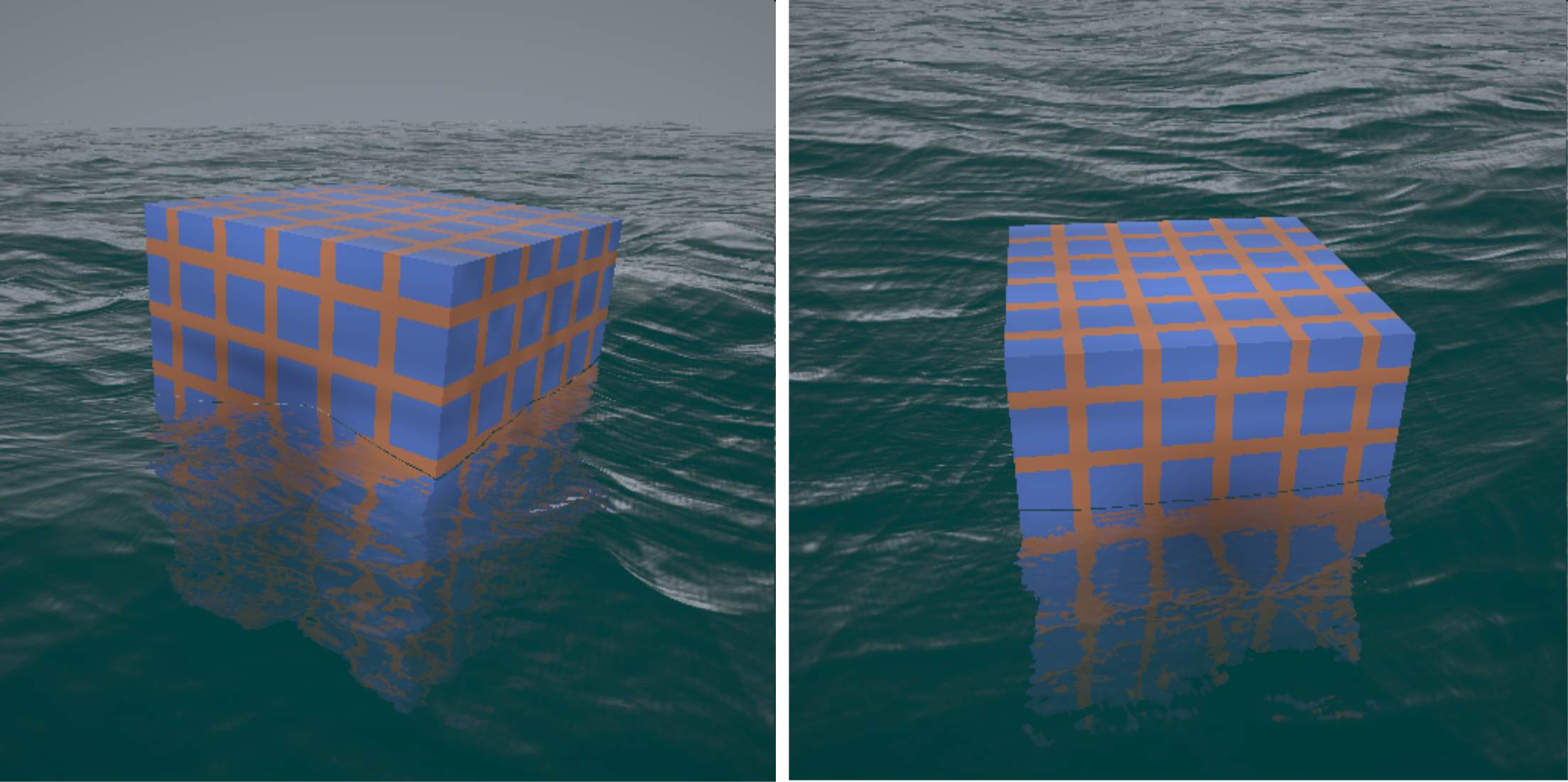
• An object is added to the water to emphasis various effect (reflection and refraction)
• Object bounces around due to the water
• Pattern on the object is generated using the object shape/position surface
• Interactive so you can move your mouse around to see the shape/water from different angles
Beauty of Water
The ocean is a breathtaking spectacle of beauty and tranquility, a boundless expanse that captivates with its vastness and timeless allure. Its surface shimmers under the sun, shifting in shades from deep sapphire to light turquoise, each wave catching the light in a dance as ancient as the earth itself. The ocean's movement is mesmerizing—gentle ripples glide across calm bays, while powerful waves roll with a grace that's both majestic and soothing. There is a profound simplicity in the way the ocean breathes in rhythmic tides, rising and falling with a calming constancy, connecting shorelines and washing over sands in an eternal cycle. Beneath the surface lies a world of delicate beauty and vibrant life, hidden mysteries that evoke both wonder and peace. The ocean's endless horizons remind us of nature's vastness, inspiring awe and reflection in its quiet, powerful presence.
The output for the example water simulation.
Fragment Shader
The complete implementation is in the fragment shader! Essentially a brute force ray-tracer - for each pixel it calculates the intersection with the water surface and then the lighting calculation (reflections, etc).
Complete fragment shader code is given below:
// Don't use images but is an extra for texturing the shape
@group(0) @binding(0) var  mySampler: sampler;
@group(0) @binding(1) var  myTexture: texture_2d<f32>;
@group(0) @binding(2) var <uniform> mytimer : f32;
@group(0) @binding(3) var <uniform> mymouse : vec2<f32>;

const resolution = vec2<f32>(512, 512);

fn ToGamma( col:vec3<f32> ) -> vec3<f32>
{
    // Gamma correction
    let GammaFactor:f32 = 2.2;
    // convert back into color values, so the correct light will come out of the monitor
    return pow( col, vec3(1.0/GammaFactor) );
}
Calculates camera position and direction based on rotation, zoom, and screen coordinates.
Outputs a camera structure with `pos`, `ray`, and `localRay` for viewing direction and origin.
<?php
struct stCam {
    pos: vec3<f32>,
    ray: vec3<f32>,
    localRay: vec3<f32>
};

fn CamPolar( origin:vec3<f32>, rotation:vec2<f32>, distance:f32, zoom:f32, fragCoord:vec2<f32> ) -> stCam
{
    var cam: stCam;
    // get rotation coefficients
    var c: vec2<f32> = vec2(cos(rotation.x),cos(rotation.y));
    var tmp = vec2(sin(rotation.x),sin(rotation.y));

    var s: vec4<f32> = vec4<f32>( tmp.xy, -tmp.xy );

    // ray in view space
    cam.ray = vec3( fragCoord.xy - resolution.xy*.5, resolution.y*zoom );

    cam.ray = normalize(cam.ray);

    cam.localRay = cam.ray;

    // rotate ray
    var tmp2 = cam.ray.yz*c.xx + cam.ray.zy*s.zx;
    cam.ray = vec3( cam.ray.x, tmp2 );

    tmp2 = cam.ray.xz*c.yy + cam.ray.zx*s.yw;
    cam.ray = vec3( tmp2.x, cam.ray.y, tmp2.y );

    // position camera
    cam.pos = origin - distance*vec3(c.x*s.y,s.z,c.x*c.y);

    return cam;
}
Generates a pseudo-random number based on input `uv` coordinates.
Useful for creating randomness in textures and patterns.
Smooths random values to create a cohesive noise pattern.
Interpolates values between tile corners, resulting in smooth, blended noise.
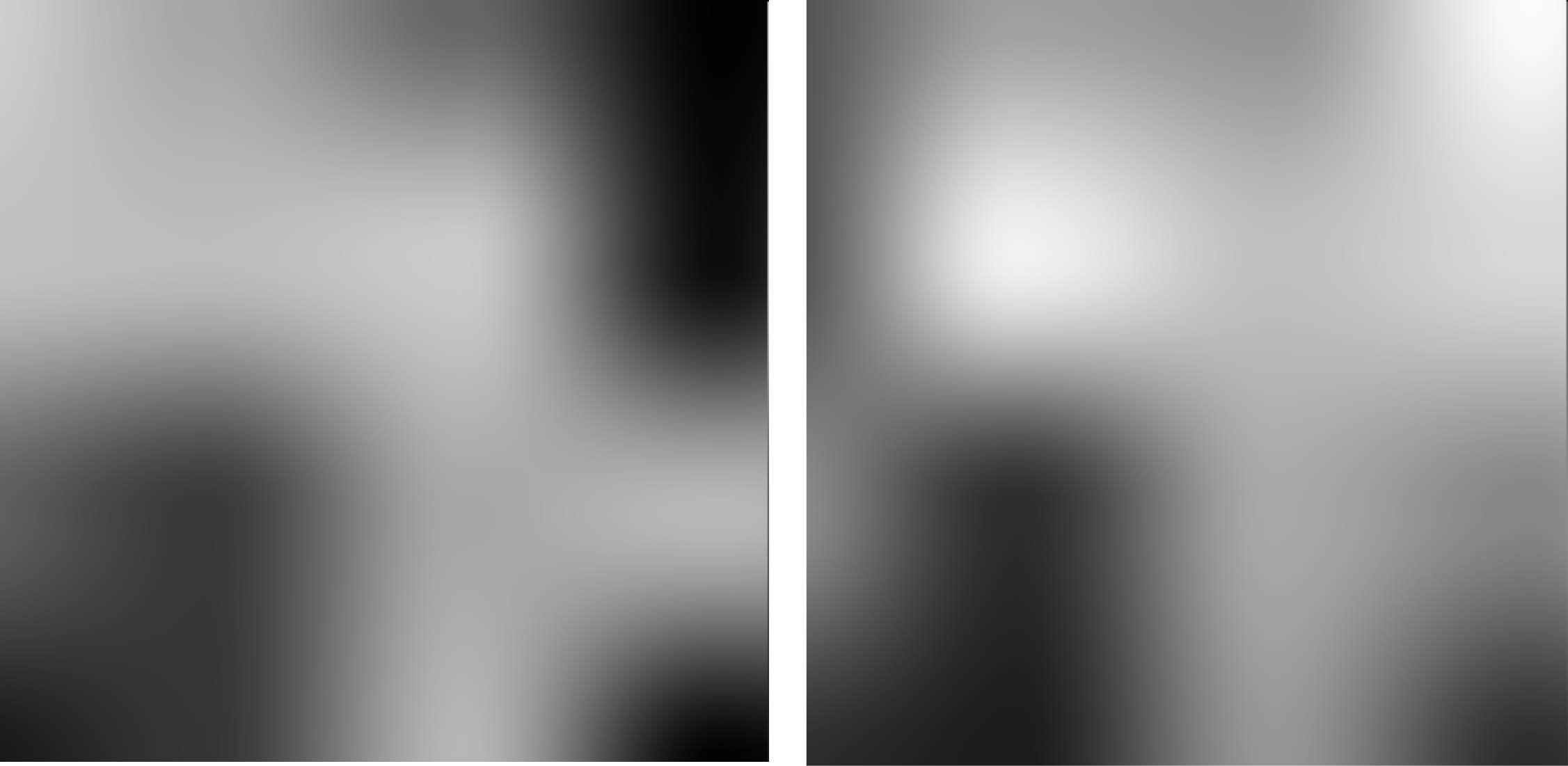
You can see what the smooth noise function generates. .
You can try out an interactive noise demo showing the smooth noise scrolling LINK.
fn randomsmooth( st:vec2<f32> ) -> f32
{
    var i = floor( st * 3.0 ); // uv - 0,   1,   2,   3,
    var f = fract( st * 3.0 ); // uv - 0-1, 0-1, 0-1, 0-1

    // Four corners in 2D of a tile
    var a = random(i);
    var b = random(i + vec2<f32>(1.0, 0.0));
    var c = random(i + vec2<f32>(0.0, 1.0));
    var d = random(i + vec2<f32>(1.0, 1.0));

    // Ease-in followed by an ease-out (tweening) for f
    // f = 0.5 * (1.0 - cos( 3.14 * f ) );
    // version without cos/sin
    // f = 3*f*f - 2*f*f*f;

    f = 3*f*f - 2*f*f*f;

    // bilinear interpolation to combine the values sampled from the
    // four corners (a,b,c,d), resulting in a smoothly interpolated value.

    // Interpolate Along One Axis - interpolate between `a` and `b` using the fractional coordinate `f.x`,
    // then interpolate between `c` and `d` using the same `f.x`.
    // This gives two intermediate values, say `e` and `f`.

    // Interpolate Along the Other Axis - linearly interpolate between `e` and `f`
    // using the fractional coordinate `f.y`.
    // Final interpolation gives a moothly interpolated value across the square

    var x1 = mix( a, b, f.x );
    var x2 = mix( c, d, f.x );

    var y1 = mix( x1, x2, f.y );

    return y1;
}
Produces 3D noise using smoothed random functions for multi-dimensional use.
The precise version is to refine the noise by scaling input coordinates, creating a sharper noise effect.
Simulates a dynamic wave effect by repeatedly displacing positions over octaves.
Uses multiple layers of random noise for complex wave shapes.
fn Waves( posin:vec3<f32> ) -> f32
{
    var pos = posin * 0.2*vec3(1,1,1);

    const octaves:i32 = 5;
    var f:f32 = 0.0;

    pos += mytimer*vec3(0,.1,.1);
    for ( var i:i32=0; i < octaves; i++ )
    {
        pos = (pos.yzx + pos.zyx*vec3(1,-1,1))/sqrt(2.0);
        f  = f*2.0+abs(Noise(pos).x-.5)*2.0;
        pos *= 2.0;
    }
    f /= exp2(f32(octaves));

    return (.5-f)*1.0;
}
Generates detailed wave shapes with more octaves and smooth blending.
Useful for creating complex water surface dynamics.
fn WavesDetail( posin:vec3<f32> ) -> f32
{
    var pos = posin * 0.2*vec3(1,1,1);

    const octaves:i32 = 8;
    var f:f32 = 0.0;

    // need to do the octaves from large to small, otherwise things don't line up
    // (because I rotate by 45 degrees on each octave)
    pos += mytimer*vec3(0,.1,.1);
    for ( var i:i32=0; i < octaves; i++ )
    {
        pos = (pos.yzx + pos.zyx*vec3(1,-1,1))/sqrt(2.0);
        f  = f*2.0+abs(NoisePrecise(pos).x-0.5)*2.0;
        pos *= 2.0;
    }
    f /= exp2(f32(octaves));

    return (.5-f)*1.0;
}
Creates smoother wave effects by applying additional noise blending.
Creates a gentler water surface than other wave functions.
fn WavesSmooth( posin:vec3<f32> ) -> f32
{
    var pos = posin * 0.2*vec3(1,1,1);

    const octaves:i32 = 2;
    var f:f32 = 0.0;

    pos += mytimer*vec3(0,.1,.1);
    for ( var i:i32=0; i < octaves; i++ )
    {
        pos = (pos.yzx + pos.zyx*vec3(1,-1,1))/sqrt(2.0);

        f  = f*2.0+sqrt(pow(NoisePrecise(pos).x-.5,2.0)+.01)*2.0;
        pos *= 2.0;
    }
    f /= exp2(f32(octaves));

    return (.5-f)*1.0;
}
Smoothly interpolates values between two edges, `edge0` and `edge1`.
Applies smoothing to input `x` to reduce sharp transitions.
Also a builtin version `smoothstep` but the custom version was used so we could tinker with the values while experimenting.
fn mysmoothstep( edge0:f32, edge1:f32, x:f32 ) -> f32
{
    // Clamp the input value between 0 and 1
    var t:f32 = clamp((x - edge0) / (edge1 - edge0), 0.0, 1.0);
    // Apply the smoothstep formula
    return t * t * (3.0 - 2.0 * t);
}
Simulates foam on wave crests based on input position.
Enhances wave realism by adding bright foam to high wave areas.
fn WaveCrests( ipos:vec3<f32>, fragCoord:vec2<f32> ) -> f32
{
    var pos:vec3<f32> = ipos;
    pos = pos * 0.2*vec3<f32>(1,1,1);

    const octaves1:i32 = 6;
    const octaves2:i32 = 16;
    var f:f32 = 0.0;

    pos += mytimer*vec3(0,.1,.1);
    var pos2 = pos;
    for ( var i:i32=0; i < octaves1; i++ )
    {
        pos = (pos.yzx + pos.zyx*vec3(1,-1,1))/sqrt(2.0);
        f = f*1.5+abs(Noise(pos).x-.5)*2.0;
        pos *= 2.0;
    }
    pos = pos2 * exp2(f32(octaves1));
    pos.y = -.05*mytimer;
    for ( var i:i32=octaves1; i < octaves2; i++ )
    {
        pos = (pos.yzx + pos.zyx*vec3(1,-1,1))/sqrt(2.0);
        f  = f*1.5+pow(abs(Noise(pos).x-.5)*2.0,1.0);
        pos *= 2.0;
    }
    f /= 1500.0;

    f -= Noise( vec3<f32>(fragCoord.xy, fragCoord.x*1.29323) ).x * 0.01;

    return pow(mysmoothstep(.4,-.1,f),6.0);
}
Defines background sky color based on ray direction.
Blends colors to create a horizon and zenith transition.
/*
// Constant sky color
fn Sky( ray:vec3<f32> ) -> vec3<f32>
{
    return vec3(.5,.45,.54);
}
*/

fn Sky(ray: vec3<f32>) -> vec3<f32> {
    let horizon_color = vec3(.4,.45,.5); // Light blue near the horizon
    let zenith_color = vec3(.4,.45,.5)*0.1; // Darker blue for the sky above

    // Calculate a factor based on the Y component of the ray direction
    // Higher y value means looking up, lower means closer to horizon
    let blend_factor = clamp(ray.y * 0.5 + 0.5, 0.0, 1.0);

    // Blend between zenith and horizon colors based on blend_factor
    return mix(horizon_color, zenith_color, blend_factor);
}
Calculates the boat's position, orientation, and movement based on water surface.
Returns a `stBoat` structure with direction vectors and orientation matrix.
<?php
struct stBoat
{
    right    : vec3<f32>,
    up       : vec3<f32>,
    forward  : vec3<f32>,
    position : vec3<f32>,
    rotation : mat3x3<f32>
};

fn ComputeBoatTransform() -> stBoat
{
    var samples : array<vec3<f32>, 5>;

    samples[0] = vec3(0,0, 0);
    samples[1] = vec3(0,0, .5);
    samples[2] = vec3(0,0,-.5);
    samples[3] = vec3( .5,0,0);
    samples[4] = vec3(-.5,0,0);

    samples[0].y = WavesSmooth(samples[0]);
    samples[1].y = WavesSmooth(samples[1]);
    samples[2].y = WavesSmooth(samples[2]);
    samples[3].y = WavesSmooth(samples[3]);
    samples[4].y = WavesSmooth(samples[4]);

    var boat: stBoat;
    boat.position = (samples[0]+samples[1]+samples[2]+samples[3]+samples[4])/5.0;

    boat.right   = samples[3]-samples[4];
    boat.forward = samples[1]-samples[2];
    boat.up      = normalize(cross(boat.forward,boat.right));
    boat.right   = normalize(cross(boat.up,boat.forward));
    boat.forward = normalize(boat.forward);

    boat.rotation = mat3x3<f32>(
        boat.right.x, boat.up.x, boat.forward.x,
        boat.right.y, boat.up.y, boat.forward.y,
        boat.right.z, boat.up.z, boat.forward.z
    );

    // Push the object up or down (under water if we want).
    boat.position += 0.0*boat.up;

    return boat;
}
Offset the object so it's under water - or just on the surface bobbing in and out - by adjust ting the ComputeBoatTransform() position offset.
Signed distance function for a cube and sphere for ray-marching.
Ray-marches along a ray to detect intersections with the boat.
Uses a distance function to trace until hitting the boat or reaching max distance.
fn TraceBoat( rayPos:vec3<f32>,  rayDir:vec3<f32>) ->f32
{
    let boat    = ComputeBoatTransform();
    var boatPos = boat.position;
    let cubeRot = boat.rotation;

    var t = 0.0;
    for(var i:i32 = 0; i < 256; i++)
    {
        var samplePoint:vec3<f32> = rayPos + rayDir*t;

        let localRayPos = transpose(cubeRot) * (samplePoint - boatPos);

        // Use any sdf shape!  - sphere, cube, ..etc
        //var dist = sdfSphere(samplePoint, boatPos, 1.0 );

        var dist = sdfCube(localRayPos, vec3(0.001), vec3(1.0) );
        t += dist;
        if ( t < 0.01 || t > 1000 )
        {
            return 0.0; // no hit
        }
    }
    return t;
}
Calculates the surface normal for the boat at the intersection point.
Uses small offsets to determine normal based on neighboring distances.
fn rayNormal( rayPos:vec3<f32>,  rayDir:vec3<f32> ) -> vec3<f32>
{
    var s = 0.0001;
    var d = TraceBoat(rayPos,rayDir);
    var a = vec3<f32>(rayPos.x + s, rayPos.y,     rayPos.z    );
    var b = vec3<f32>(rayPos.x,     rayPos.y + s, rayPos.z    );
    var c = vec3<f32>(rayPos.x,     rayPos.y,     rayPos.z + s);
    var normal = normalize(vec3<f32>(
                    TraceBoat(a, rayDir) - d,
                     TraceBoat(b, rayDir) - d,
                     TraceBoat(c, rayDir) - d) );
    return normal;
}
Adds color and texture to the boat, simulating wood grain or painted patterns.
Uses noise to vary colors and create realistic surface patterns.
fn ShadeBoatPattern( surfacePos:vec3<f32> ) -> vec3<f32>
{
    let boat = ComputeBoatTransform();
    let cubePos = boat.position; // vec3
    let cubeRot = boat.rotation; // mat3x3

    // Transform surface position into local space
    let localPos = transpose(cubeRot) * (surfacePos - cubePos);

    let frequency = 11.0;
    let color0 = vec3(0.5, 0.2, 0.1); // Base color
    let color1 = vec3(0.1, 0.2, 0.6); // Stripe color

    let noisepattern = 0.2 +
                       Noise( localPos*12.0 ).x * 0.3 +
                       Noise( localPos*3.0 ).y * 0.7;

    if ( floor(localPos.x * frequency) % 4.0 == 0.0 ||
         floor(localPos.z * frequency) % 4.0 == 0.0 ||
         floor(localPos.y * frequency) % 4.0 == 0.0 )
    {
        return color0 * noisepattern;
    }
    return color1 * noisepattern;


}
Colors the boat surface based on light direction, reflections, and textures.
Calculates the boat's shading using normals, lighting, and fresnel reflections.
fn ShadeBoat( posin:vec3<f32>, ray:vec3<f32> ) -> vec3<f32>
{
    var t:f32 = TraceBoat( posin, ray );
    var hp = posin + ray*t;
    var norm = rayNormal( posin, ray );

    var lightDir:vec3<f32> = normalize(vec3(-2,3,1));
    var ndotl:f32 = 0.2 + abs( dot(norm,lightDir) );

    // allow some light bleed, as if it's subsurface scattering through plastic
    var light:vec3<f32> = mysmoothstep(-.1,1.0,ndotl)*vec3(1.0,.9,.8)+vec3(.06,.1,.1);

    var albedo:vec3<f32> = ShadeBoatPattern(hp);

    var col:vec3<f32> = albedo*ndotl;

    // specular
    var h:vec3<f32> = normalize(lightDir-ray);
    var s:f32 = pow(max(0.0,dot(norm,h)),100.0)*100.0/32.0;

    var specular:vec3<f32> = s*vec3(1.1);

    var rr:vec3<f32> = reflect(ray,norm);
    specular += mix( vec3(0,.04,.04), Sky(rr), mysmoothstep( -.1, .1, rr.y ) );

    var ndotr:f32 = dot(norm,ray);
    var fresnel:f32 = pow(1.0-abs(ndotr),5.0);
    fresnel = mix( .001, 1.0, fresnel );

    col = mix( col, specular, fresnel );

    return col;
}
Calculates distance from a point to the ocean surface, modified by wave height.
Used for ray-marching to the water surface. Refined version is for more detail using additional wave calculations.
Ray-marches through the scene to detect intersections with the ocean surface.
Stops when close to the surface or exceeding max distance.
fn TraceOcean( pos:vec3<f32>, ray:vec3<f32> ) -> f32
{
    var h:f32 = 1.0;
    var t:f32 = 0.0;
    for ( var i:i32=0; i < 100; i++ )
    {
        if ( h < .01 || t > 100.0 )
        {
            break;
        }
        h = OceanDistanceField( pos+t*ray );
        t += h;
    }

    if ( h > .1 )
    {
        return 0.0;
    }
    return t;
}
Colors the ocean surface by calculating reflections, foam, and fresnel effect.
Blends refractions and reflections for realistic water appearance.
fn ShadeOcean( pos:vec3<f32>, ray:vec3<f32>, fragCoord:vec2<f32> ) -> vec3<f32>
{
    var norm:vec3<f32> = OceanNormal(pos);
    var ndotr:f32 = dot(ray,norm);

    var fresnel:f32 = pow(1.0-abs(ndotr),5.0);

    var reflectedRay:vec3<f32> = ray-2.0*norm*ndotr;
    var refractedRay:vec3<f32> = ray+(-cos(1.33*acos(-ndotr))-ndotr)*norm;
    refractedRay = normalize(refractedRay);

    const episonFudge:f32 = 0.0;

    // reflection
    var reflection:vec3<f32> = Sky(reflectedRay);
    var t:f32 = TraceBoat( pos-episonFudge*reflectedRay, reflectedRay );

    if ( t > 0.0 )
    {
        reflection = ShadeBoat( pos-episonFudge*reflectedRay, reflectedRay );
    }

    // refraction
    t = TraceBoat( pos-episonFudge*refractedRay, refractedRay );

    var col:vec3<f32> = vec3(0,.04,.04); // under-sea color
    if ( t > 0.0 )
    {
        col = mix( col, ShadeBoat( pos-episonFudge*refractedRay, refractedRay ), exp(-t) );
    }

    col = mix( col, reflection, fresnel );

    // foam
    col = mix( col, vec3(1), WaveCrests(pos,fragCoord) );

    return col;
}
Primary fragment shader function for rendering the scene.
Determines the camera view and calculates shading for sky, ocean, and boat.
// Shader entry point
@fragment
fn main(@location(0) uvs    : vec2<f32>) -> @location(0) vec4<f32>
{
    var fragCoord = uvs * resolution;

    var camRot:vec2<f32> = vec2(.5,.5) + vec2(-.35,4.5)*(mymouse.yx/resolution.yx);

    var cam = CamPolar( vec3(0), camRot, 5.0, 1.0, fragCoord );

    var to:f32 = TraceOcean( cam.pos, cam.ray );
    var tb:f32 = TraceBoat( cam.pos, cam.ray );

    var result: vec3<f32>;
    if ( to > 0.0 && ( to < tb || tb == 0.0 ) )
    {
        result = ShadeOcean( cam.pos+cam.ray*to, cam.ray, fragCoord );
    }
    else if ( tb > 0.0 )
    {
        result = ShadeBoat( cam.pos, cam.ray );
    }
    else
    {
        result = Sky( cam.ray );
    }


    // vignette effect
    result *= 1.1 * mysmoothstep( .35, 1.0, cam.localRay.z );

    var fragColor = vec4(ToGamma(result),1.0);

    return fragColor;
}
Things to Try
The example as only scratched the surface of what is possible an what you can do next! Some interesting and fun ideas to take it further include:
• Tweak the sea noise generation (it's okay, but could still be improved)
• Different noise patterns can generate different ocean water types (deep, shallow, ...)
• Use 2d map to make different parts of the water use different noise (e.g., close to short or deep water, behaves differently)
• Also modify the noise - so if it's close to the object uses a different noise pattern
• Add some under water creatures, whale or fished?
• Add some 'splash' effects (particles)
• SDF shape - simple box or sphere - but try other shapes
• SDF shape of a 'bottle' - but make it transparent? (glass bottle floating at sea)
• Add background sky/sunset
• Draw lots of things int he water (e.g., rubbish, coke cans, use 'mod' so you can draw hundreds of them)
• Make the water effect into game? little boat driving around?
• Use the texture for the floating object (instead of a generated pattern - texture mapped ot the surface)
• Add interface to allow users to tinker with the variables
• Create a demo scene with sand islands coming out of the water, fish jumping, palm trees, and a sun moving across the sky.