The core idea of the bitonic sort algorithm is to recursively build bitonic sequences from smaller bitonic sequences, and then merge them into a fully sorted sequence. This recursive process involves sorting subsequences and then merging them in a way that preserves the bitonic property.
The process starts by dividing the sequence into pairs and sorting each pair in ascending and descending order, effectively creating multiple bitonic sequences of length two.
These sequences are then merged into longer bitonic sequences by comparing and swapping elements to ensure that the merged sequences maintain the bitonic property. This merging step is performed iteratively, doubling the length of the bitonic sequences at each stage until the entire sequence is sorted.
The merge operation uses a compare-and-swap mechanism that is parallelizable, making the algorithm highly efficient on parallel processing units.
One of the key features of the bitonic sort is its regular structure, which makes it particularly amenable to implementation on hardware with a fixed, predictable pattern of data movement and comparison.
This regularity allows for efficient utilization of memory bandwidth and computational resources in parallel computing environments. As a result, bitonic sort is widely used in applications that benefit from parallel processing capabilities, such as GPU-based computing and hardware sorting networks, despite its O(n log^2 n) time complexity, which is higher than the optimal O(n log n) complexity of other comparison-based sorting algorithms like quicksort and mergesort.
Complete Code
const wgslcompute = `
struct Data {
    numbers: array<f32>
};

@group(0) @binding(0) var<storage, read_write> data : Data;

fn compareAndSwap(i: u32, j: u32, dir: bool) {
    if ((data.numbers[i] > data.numbers[j]) == dir) {
        let temp = data.numbers[i];
        data.numbers[i] = data.numbers[j];
        data.numbers[j] = temp;
    }
}

@compute @workgroup_size(64)
fn main( @builtin(global_invocation_id) id: vec3<u32>)
{
    var k: u32 = 2;
    let datalength = arrayLength( &data.numbers );

    while ( k <= datalength )
    {
        var j: u32 = k >> 1;
        while (j > 0) {
            let idx = id.x;
            let ixj = idx ^ j;
            if (ixj > idx) {
                let direction = ((idx & k) == 0);
                compareAndSwap(idx, ixj, direction);
            }
            j = j >> 1;
            workgroupBarrier();
        }
        k = k << 1;
    }
}
`;

let div = document.createElement('div');
document.body.appendChild( div );
div.style['font-size'] = '20pt';
function log( s )
{
  console.log( s );
  let args = [...arguments].join(' ');
  div.innerHTML += args + '<br>';
}

log('WebGPU Compute Example');

if (!navigator.gpu) { log("WebGPU is not supported (or is it disabled? flags/settings)"); return; }

const adapter = await navigator.gpu.requestAdapter();
const device  = await adapter.requestDevice();


const arraySize = 128;
const data0 = new Float32Array(arraySize);
for (let i = 0; i < arraySize; i++) {
  data0[i] = Math.round( Math.random() * 100.0 );
}

const gbuffer0 = device.createBuffer({ size:  data0.byteLength, usage: GPUBufferUsage.STORAGE | GPUBufferUsage.COPY_DST | GPUBufferUsage.COPY_SRC });
device.queue.writeBuffer(gbuffer0, 0, data0);

const resultBuffer = device.createBuffer({ size: data0.byteLength, usage: GPUBufferUsage.STORAGE | GPUBufferUsage.COPY_SRC | GPUBufferUsage.COPY_DST });

const readbackBuffer = device.createBuffer({ size: data0.byteLength, usage: GPUBufferUsage.COPY_DST | GPUBufferUsage.MAP_READ });


const bindGroupLayout = device.createBindGroupLayout({
  entries: [ {binding: 0, visibility: GPUShaderStage.COMPUTE, buffer: {type: "storage"} } ]
});

const bindGroup = device.createBindGroup({
  layout: bindGroupLayout,
  entries: [{ binding: 0,  resource: {  buffer: gbuffer0  }  }]
});

const shaderModule = device.createShaderModule( {  code: wgslcompute } );

const computePipeline = device.createComputePipeline({
  layout: device.createPipelineLayout({bindGroupLayouts: [bindGroupLayout]}),
  compute: { module: shaderModule,
             entryPoint: 'main'  }
});

const commandEncoder = device.createCommandEncoder();
const passEncoder = commandEncoder.beginComputePass();
passEncoder.setPipeline(computePipeline);
passEncoder.setBindGroup(0, bindGroup);
passEncoder.dispatchWorkgroups(arraySize / 64);
passEncoder.end();

commandEncoder.copyBufferToBuffer(gbuffer0, 0, resultBuffer, 0, data0.byteLength);
commandEncoder.copyBufferToBuffer(resultBuffer, 0, readbackBuffer, 0, data0.byteLength);

const commands = commandEncoder.finish();
device.queue.submit([commands]);

await readbackBuffer.mapAsync(GPUMapMode.READ);
const sortedArray = new Float32Array(readbackBuffer.getMappedRange());
console.log(sortedArray);

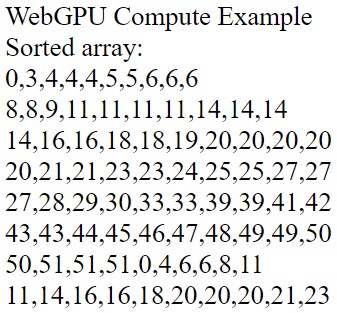
log('Sorted array:')
const arr = Array.from( sortedArray );
for (let i=0; i<arr.length; i++)
{
      // display over multiple lines
    log( arr.splice( 0, 10 ) );
}
Things t Try
• Try a larger array size
• Try different workgroup sizes (log the time it takes to sort - plot the results)
• Research other sort algorithms that can be implemented on the GPU