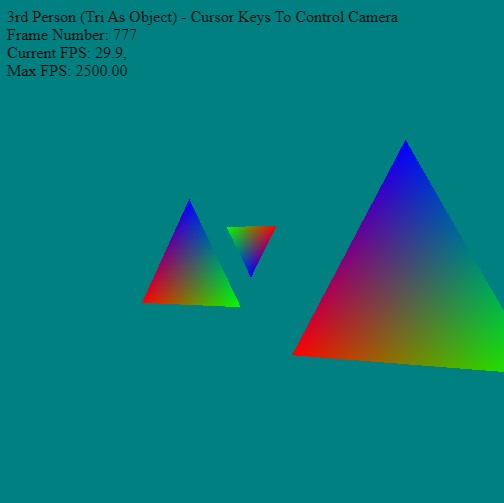
The camera in the example has a single small triangle as the target - so as you move around with the cursor keys - you'll see that the triangle always stays in front the camera.
Create a static object to hold the camera - so the functionality can be contained in one place.
// A 'static' property in JavaScript is best represented by a property directly on the constructor function itself

function camera() {}

camera.zero     = {x:0, y:0, z:0};
camera.up       = {x:0, y:1, z:0};

camera.position = camera.zero;
camera.view     = {x:0, y:0, z:-1};


  // This function sets the camera's position and view and up vectors
camera.PositionCamera = function ( positionX, positionY, positionZ, // target
                                     viewX,     viewY,     viewZ,     // position of the camera
                                   upX,       upY,       upZ)
  {
    camera.position = {x:positionX, y:positionY, z:positionZ};
    camera.view        = {x:viewX,     y:viewY,     z:viewZ};
    camera.up       = {x:upX,       y:upY,       z:upZ};
  }

  // This rotates the view around the position using an axis-angle rotation
camera.RotateView = function(angle,  x,  y,  z)
  {
    // Get the view vector (The direction we are facing)
    let tmpview = {x:camera.view.x-camera.position.x,
                   y:camera.view.y-camera.position.y,
                   z:camera.view.z-camera.position.z};

    // Calculate the sine and cosine of the angle once
    let cosTheta = Math.cos(angle);
    let sinTheta = Math.sin(angle);

    // Find the new x position for the new rotated point
    camera.view.x  = (cosTheta + (1 - cosTheta) * x * x)        * tmpview.x;
    camera.view.x += ((1 - cosTheta) * x * y - z * sinTheta)    * tmpview.y;
    camera.view.x += ((1 - cosTheta) * x * z + y * sinTheta)    * tmpview.z;

    // Find the new y position for the new rotated point
    camera.view.y  = ((1 - cosTheta) * x * y + z * sinTheta)    * tmpview.x;
    camera.view.y += (cosTheta + (1 - cosTheta) * y * y)        * tmpview.y;
    camera.view.y += ((1 - cosTheta) * y * z - x * sinTheta)    * tmpview.z;

    // Find the new z position for the new rotated point
    camera.view.z  = ((1 - cosTheta) * x * z - y * sinTheta)    * tmpview.x;
    camera.view.z += ((1 - cosTheta) * y * z + x * sinTheta)    * tmpview.y;
    camera.view.z += (cosTheta + (1 - cosTheta) * z * z)        * tmpview.z;

    // Add the newly rotated vector to our position to set our new rotated view of our camera.
    camera.view = {x:camera.view.x+camera.position.x,
                   y:camera.view.y+camera.position.y,
                   z:camera.view.z+camera.position.z};
  }


  // This rotates the position around a given point
camera.RotateAroundPoint = function(center, angle, x, y, z)
  {
    // To rotate our position around a point, what we need to do is find
    // a vector from our position to the center point we will be rotating around.
    // Once we get this vector, then we rotate it along the specified axis with
    // the specified degree.  Finally the new vector is added center point that we
    // rotated around (center) to become our new position.

    // Get the vVector from our position to the center we are rotating around
    let tmppos = {x:camera.position.x-center.x,
                  y:camera.position.y-center.y,
                  z:camera.position.z-center.z};

    // Calculate the sine and cosine of the angle once
    let cosTheta = Math.cos(angle);
    let sinTheta = Math.sin(angle);

    // Find the new x position for the new rotated point
    camera.position.x  = (cosTheta + (1 - cosTheta) * x * x)        * tmppos.x;
    camera.position.x += ((1 - cosTheta) * x * y - z * sinTheta)    * tmppos.y;
    camera.position.x += ((1 - cosTheta) * x * z + y * sinTheta)    * tmppos.z;

    // Find the new y position for the new rotated point
    camera.position.y  = ((1 - cosTheta) * x * y + z * sinTheta)    * tmppos.x;
    camera.position.y += (cosTheta + (1 - cosTheta) * y * y)        * tmppos.y;
    camera.position.y += ((1 - cosTheta) * y * z - x * sinTheta)    * tmppos.z;

    // Find the new z position for the new rotated point
    camera.position.z  = ((1 - cosTheta) * x * z - y * sinTheta)    * tmppos.x;
    camera.position.z += ((1 - cosTheta) * y * z + x * sinTheta)    * tmppos.y;
    camera.position.z += (cosTheta + (1 - cosTheta) * z * z)        * tmppos.z;

    // Now we just add the newly rotated vector to our position to set
    // our new rotated position of our camera.
    camera.position = {x:camera.position.x+center.x,
                       y:camera.position.y+center.y,
                       z:camera.position.z+center.z};
  }

  // This will move the camera forward or backward depending on the speed
camera.MoveCamera = function(speed)
  {
    // Get our view vector (The direciton we are facing)
    let dir = {x:camera.view.x-camera.position.x,
               y:camera.view.y-camera.position.y,
               z:camera.view.z-camera.position.z};

    camera.position.x += dir.x * speed;        // Add our acceleration to our position's X
    camera.position.z += dir.z * speed;        // Add our acceleration to our position's Z
    camera.view.x += dir.x * speed;            // Add our acceleration to our view's X
    camera.view.z += dir.z * speed;            // Add our acceleration to our view's Z
  }

camera.GetViewMatrix = function()
  {
    // Give webgpu our camera position, then camera view, then camera up vector
      let viewMatrix = mat4.create();

    mat4.lookAt(viewMatrix,
               Object.values(camera.position),
               Object.values(camera.view),
               Object.values(camera.up));

      return viewMatrix;
  }


// Store camera object so it can be accessed anywhere by any other objects
window.camera = camera;