 | Camera Pitch |  |
Looking up and down with the camera pitch.
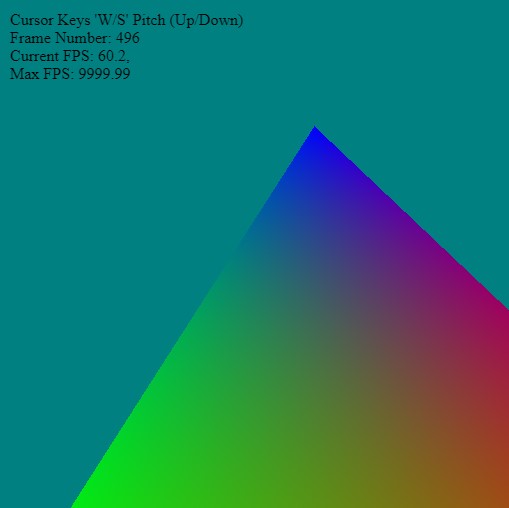 Looking up and down using camera 'pitch' control. Looking up and down using camera 'pitch' control.
Functions Used: setVertexBuffer(), setIndexBuffer(), drawIndexed(), createBuffer(), getMappedRange(), getContext(), requestAdapter(), getPreferredCanvasFormat(), createCommandEncoder(), beginRenderPass(), setPipeline(), draw(), end(), submit(), getCurrentTexture(), createView(), createShaderModule()
The following shows the update loop for a simple `pitch` control using the event key inputs.
<?php
let counter     = 0.0;
let frameNumber = 0;
let fpsTime     = performance.now();


let cameraAt   = [ 0, 0, 0 ];
let cameraDir  = [ 0, 0, 1 ];
let yaw        = 0.0;
let pitch      = 0.0;
let cameraEye  = [ cameraAt[0]-cameraDir[0],
                   cameraAt[1]-cameraDir[1],
                   cameraAt[2]-cameraDir[2] ];


function frame()
{
  var startTime = performance.now();

  // setup a transform for triangle
  const t = { p:{x:0,y:0,z:0}, r:{x:0,y:0.0,z:0.0}, s:{x:1.0, y:1.0,z:1.0} };

  let modelMatrix = buildMatrix(t.p, t.r, t.s);
  // update the local matrix for each triangle draw differently
  device.queue.writeBuffer(mvpUniformBuffer,      0,      modelMatrix);

  // Rotate the camera around the origin in the circle
  mat4.lookAt(viewMatrix, cameraEye,  cameraAt, [0, 1, 0]);
  device.queue.writeBuffer(mvpUniformBuffer,      64,     viewMatrix);

  // simple counter
  counter += 0.001;

  const k = 0;
  const renderPassDescription = {
    colorAttachments: [{
      view: context.getCurrentTexture().createView(),
      loadOp: (k==0 ? "clear":"load"),
      clearValue: [0, 0.5, 0.5, 1], // clear screen to color
      storeOp: 'store'
    }],
    depthStencilAttachment: {
      view: depthTexture.createView(),
      depthLoadOp: (k==0 ? "clear":"load"),
      depthClearValue: 1,
      depthStoreOp: "store",
    }
  };

  renderPassDescription.colorAttachments[0].view = context.getCurrentTexture().createView();
  const commandEncoder = device.createCommandEncoder();
  const renderPass = commandEncoder.beginRenderPass(renderPassDescription);

  renderPass.setBindGroup(0, uniformBindGroup);
  renderPass.setPipeline(pipeline);
  renderPass.setVertexBuffer(0, positionBuffer);
  renderPass.setVertexBuffer(1, colorBuffer);
  renderPass.setIndexBuffer(indexBuffer, 'uint16');
  renderPass.drawIndexed(3,1);
  renderPass.end();
  device.queue.submit([commandEncoder.finish()]);

  // animate - keep updating
  requestAnimationFrame(frame);

  // --------- Timing Information -------------------------
  frameNumber++;
  var endTime = performance.now();

  var updateFPS = 1000.0 / ( endTime - fpsTime);
  var maxFPS    = 1000.0 / ( endTime - startTime);


  fpsTime = endTime;


  divInfo.innerHTML = `
  Cursor Keys 'A/D' Yaw - Rotation<br>
  Frame Number: ${frameNumber}<br>
  Current FPS: ${updateFPS.toFixed(1)},<br>
  Max FPS: ${maxFPS.toFixed(2)}
  `;
}


onkeydown = function( e )
{
  let dt = 0.2;

  switch (event.key)
  {
    case 'a': // yaw
    {
        yaw -= dt * 0.1;
    }
    break;

    case 'd':
    {
       yaw += dt * 0.1;
    }
    break;

    case 'w': // pitch
    {
       pitch += dt * 0.1;
    }
    break;

    case 's':
    {
       pitch -= dt * 0.1;
    }
    break;

    case "ArrowLeft":
    {
        cameraAt[0] += dt;
    }
    break;

    case "ArrowRight":
    {
       cameraAt[0] -= dt;
    }
    break;

    case "ArrowUp":
    {
       cameraAt[2] += dt;
    }
    break;

    case "ArrowDown":
    {
       cameraAt[2] -= dt;
    }
    break;
  }// end switch(..)

  // clamp the maximum up/down look range
  if ( pitch < -0.5 ) pitch = -0.5;
  if ( pitch >  1.5 ) pitch =  1.5;

  cameraDir = [ Math.sin(yaw), Math.sin(pitch), Math.cos(yaw) ];

  cameraEye = [ cameraAt[0]-cameraDir[0],
                cameraAt[1]-cameraDir[1],
                cameraAt[2]-cameraDir[2] ];

}// end onkeydown(..)

frame();
| Resources and Links | |
• WebGPU Lab Example [LINK]












|




