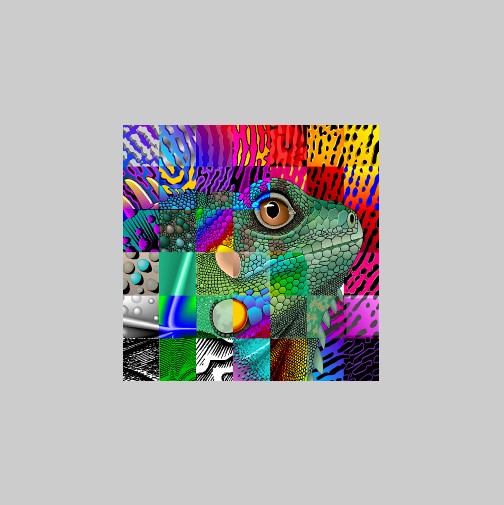
Texture Mapping (Loading Textures)
Loaded texture mapped to the surface of a square.
Functions Used: setVertexBuffer(), setIndexBuffer(), drawIndexed(), createBuffer(), getMappedRange(), getContext(), requestAdapter(), getPreferredCanvasFormat(), createCommandEncoder(), beginRenderPass(), setPipeline(), draw(), end(), submit(), getCurrentTexture(), createView(), createShaderModule()
delays . Especially for large file - they won't just download instantly!
loadTexture function - we use the async/wait so that we can be sure the image has fully downloaded before we try and copy it to the WebGPU texture buffer.
img.decode() - which will only be finished when the image has been loaded and decoded - so if this has finished the image is safe to use.
<?php
async function loadTexture ( fileName = "https://webgpulab.xbdev.net/var/images/earth.jpg" )
{
// Load image
const img = document . createElement ( "img" );
img . src = fileName ;
await Promise . all ([
img . decode ()
]);
let imgWidth = img . width ;
let imgHeight = img . height ;
const imageCanvas = document . createElement ( 'canvas' );
imageCanvas . width = imgWidth ;
imageCanvas . height = imgHeight ;
const imageCanvasContext = imageCanvas . getContext ( '2d' );
imageCanvasContext . drawImage ( img , 0 , 0 , imgWidth , imgHeight );
const imageData = imageCanvasContext . getImageData ( 0 , 0 , imgWidth , imgHeight );
let textureData = imageData . data ;
console . log ( 'textureData.byteLength:' , textureData . byteLength );
// Create a texture and a sampler using WebGPU
const sampler = device . createSampler ({
minFilter : "linear" ,
magFilter : "linear"
});
const texture = device . createTexture ({
size : [ imgWidth , imgHeight , 1 ],
format : "rgba8unorm" ,
usage : GPUTextureUsage . COPY_DST | GPUTextureUsage . TEXTURE_BINDING
});
device . queue . writeTexture (
{ texture },
textureData ,
{ bytesPerRow : imgWidth * 4 },
[ imgWidth , imgHeight , 1 ]
);
return { w : imgWidth , h : imgHeight , s : sampler , t : texture };
} // end loadTexture(..)
// Load matrix library on dynamically (on-the-fly)
let matprom = await fetch ( 'https://cdnjs.cloudflare.com/ajax/libs/gl-matrix/2.6.0/gl-matrix-min.js' );
let mattex = await matprom . text ();
var script = document . createElement ( 'script' );
script . type = 'text/javascript' ;
script . innerHTML = mattex ;
document . head . appendChild ( script );
// -------------
let canvas = document . createElement ( 'canvas' );
document . body . appendChild ( canvas ); canvas . height = canvas . width = 512 ;
const context = canvas . getContext ( 'webgpu' );
const adapter = await navigator . gpu . requestAdapter ();
const device = await adapter . requestDevice ();
const presentationFormat = navigator . gpu . getPreferredCanvasFormat ();
context . configure ({ device : device , format : presentationFormat });
async function loadTexture ( fileName = "https://webgpulab.xbdev.net/var/images/test512.png" )
{
console . log ( 'loading image:' , fileName );
// Load image
const img = document . createElement ( "img" );
img . src = fileName ;
await Promise . all ([
img . decode ()
]);
let imgWidth = img . width ;
let imgHeight = img . height ;
const imageCanvas = document . createElement ( 'canvas' );
imageCanvas . width = imgWidth ;
imageCanvas . height = imgHeight ;
const imageCanvasContext = imageCanvas . getContext ( '2d' );
imageCanvasContext . drawImage ( img , 0 , 0 , imgWidth , imgHeight );
const imageData = imageCanvasContext . getImageData ( 0 , 0 , imgWidth , imgHeight );
let textureData = imageData . data ;
console . log ( 'textureData.byteLength:' , textureData . byteLength );
// Create a texture and a sampler using WebGPU
const sampler = device . createSampler ({
minFilter : "linear" ,
magFilter : "linear"
});
const basicTexture = device . createTexture ({
size : [ imgWidth , imgHeight , 1 ],
format : "rgba8unorm" ,
usage : GPUTextureUsage . COPY_DST | GPUTextureUsage . TEXTURE_BINDING
});
await
device . queue . writeTexture (
{ texture : basicTexture },
textureData ,
{ bytesPerRow : imgWidth * 4 },
[ imgWidth , imgHeight , 1 ]
);
return { w : imgWidth , h : imgHeight , s : sampler , t : basicTexture };
} // end loadTexture(..)
function createTexturedSquare ( device )
{
let positionVertex = new Float32Array ([
0.5 , 0.5 , 0.0 ,
- 0.5 , 0.5 , 0.0 ,
0.5 , - 0.5 , 0.0 ,
- 0.5 , - 0.5 , 0.0
]);
const vBuffer = device . createBuffer ({ size : positionVertex . byteLength ,
usage : GPUBufferUsage . VERTEX | GPUBufferUsage . COPY_DST });
device . queue . writeBuffer ( vBuffer , 0 , positionVertex );
let uvVertex = new Float32Array ([
1.0 , 0.0 ,
0.0 , 0.0 ,
1.0 , 1.0 ,
0.0 , 1.0 ,
]);
const uvBuffer = device . createBuffer ({ size : uvVertex . byteLength ,
usage : GPUBufferUsage . VERTEX | GPUBufferUsage . COPY_DST });
device . queue . writeBuffer ( uvBuffer , 0 , uvVertex );
// return the vertex and texture buffers
return { v : vBuffer , t : uvBuffer };
}
function createMatrixUniform ( )
{
// Create the matrix in Javascript (using matrix library)
const projectionMatrix = mat4 . create ();
const viewMatrix = mat4 . create ();
const viewProjectionMatrix = mat4 . create ();
mat4 . perspective ( projectionMatrix , Math . PI / 2 , canvas . width / canvas . height , 0.001 , 500.0 )
mat4 . lookAt ( viewMatrix , [ 0 , 0 , 1.0 ], [ 0 , 0 , 0 ], [ 0 , 1 , 0 ]);
mat4 . multiply ( viewProjectionMatrix , projectionMatrix , viewMatrix );
// Create a buffer using WebGPU API (copy matrix into it)
const matrixUniformBuffer = device . createBuffer ({
size : viewProjectionMatrix . byteLength ,
usage : GPUBufferUsage . UNIFORM | GPUBufferUsage . COPY_DST
});
device . queue . writeBuffer ( matrixUniformBuffer , 0 , viewProjectionMatrix );
return matrixUniformBuffer ;
}
let shaderWGSL = `
@group(0) @binding(0) var<uniform> viewProjectionmMatrix : mat4x4<f32>;
struct vsout {
@builtin(position) Position: vec4<f32>,
@location(0) uvs : vec2<f32>
};
@vertex
fn vsmain(@location(0) pos : vec3<f32>,
@location(1) uvs : vec2<f32>) -> vsout
{
var r:vsout;
r.Position = viewProjectionmMatrix * vec4<f32>(pos, 1.0);
r.uvs = uvs;
return r;
}
@group(0) @binding(1) var mySampler: sampler;
@group(0) @binding(2) var myTexture: texture_2d<f32>;
@fragment
fn psmain(@location(0) uvs: vec2<f32>) -> @location(0) vec4<f32>
{
return textureSample(myTexture, mySampler, uvs );
//return vec4<f32>(1.0, 0.0, 0.5, 1.0);
} `;
const textureData = await loadTexture ( );
const squareBuffer = createTexturedSquare ( device );
const matrixUniformBuffer = createMatrixUniform ();
const shaderModule = device . createShaderModule ({ code : shaderWGSL });
// Define the layout information for the shader (uniforms)
const sceneUniformBindGroupLayout = device . createBindGroupLayout ({
entries : [{ binding : 0 , visibility : GPUShaderStage . VERTEX , buffer : { type : "uniform" } },
{ binding : 1 , visibility : GPUShaderStage . FRAGMENT , sampler : { type : "filtering" } },
{ binding : 2 , visibility : GPUShaderStage . FRAGMENT , texture : { sampleType : "float" , viewDimension : "2d" } },
]
});
const sceneUniformBindGroup = device . createBindGroup ({
layout : sceneUniformBindGroupLayout ,
entries : [{ binding : 0 , resource : { buffer : matrixUniformBuffer } },
{ binding : 1 , resource : textureData . s },
{ binding : 2 , resource : textureData . t . createView () },
]
});
const pipeline = device . createRenderPipeline ({
layout : device . createPipelineLayout ({ bindGroupLayouts : [ sceneUniformBindGroupLayout ]}),
vertex : { module : shaderModule , entryPoint : 'vsmain' ,
buffers : [
{ arrayStride : 4 * 3 , attributes : [ { shaderLocation : 0 , offset : 0 , format : 'float32x3' } ] },
{ arrayStride : 4 * 2 , attributes : [ { shaderLocation : 1 , offset : 0 , format : 'float32x2' } ] }
]
},
fragment : { module : shaderModule , entryPoint : 'psmain' ,
targets : [ { format : presentationFormat } ]
},
primitive : { topology : 'triangle-strip' },
});
function draw ()
{
const commandEncoder = device . createCommandEncoder ();
const renderPassDescriptor = { // GPURenderPassDescriptor
colorAttachments : [ { view : context . getCurrentTexture (). createView (),
loadOp : "clear" ,
clearValue : [ 0.8 , 0.8 , 0.8 , 1 ], // clear screen to color/rgba
storeOp : 'store' } ] };
const passEncoder = commandEncoder . beginRenderPass ( renderPassDescriptor );
passEncoder . setViewport ( 0.0 , 0.0 , // x, y
canvas . width , canvas . height , // width, height
0 , 1 ); // minDepth, maxDepth
passEncoder . setPipeline ( pipeline );
passEncoder . setVertexBuffer ( 0 , squareBuffer . v );
passEncoder . setVertexBuffer ( 1 , squareBuffer . t );
passEncoder . setBindGroup ( 0 , sceneUniformBindGroup );
passEncoder . draw ( 4 , 1 , 0 , 0 );
passEncoder . end ();
device . queue . submit ([ commandEncoder . finish ()]);
//requestAnimationFrame(frame);
}
draw ();
console . log ( 'done...' );
Resources and Link
LINK ]