Motion Blur
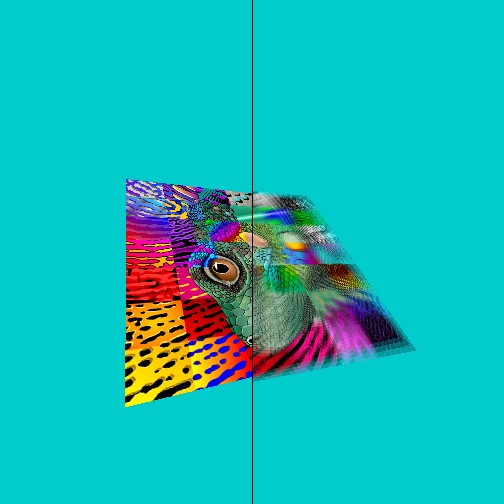
Quad if flying around - with motion blur begin shown - we show the motion blur on the right side, and without on the left - just so you can compare.
Functions Used: setVertexBuffer(), setIndexBuffer(), drawIndexed(), createBuffer(), getMappedRange(), getContext(), requestAdapter(), getPreferredCanvasFormat(), createCommandEncoder(), beginRenderPass(), setPipeline(), draw(), end(), submit(), getCurrentTexture(), createView(), createShaderModule()
<?php
fullscreenquad = function()
{
const s = 1.0 ;
this . positions = new Float32Array ([- s , s , 0 ,
- s , - s , 0 ,
s , - s , 0 ,
s , s , 0 ]);
this . indices = new Uint32Array ([ 0 , 1 , 2 , 2 , 3 , 0 ]);
this . uvs = new Float32Array ([ 0 , 0 , 1 , 0 , 1 , 1 , 0 , 1 ]);
this . create = async function( device , presentationFormat , presentationSize )
{
this . positionBuffer = device . createBuffer ({
size : this . positions . byteLength ,
usage : GPUBufferUsage . VERTEX | GPUBufferUsage . COPY_DST
});
this . uvBuffer = device . createBuffer ({
size : this . uvs . byteLength ,
usage : GPUBufferUsage . VERTEX | GPUBufferUsage . COPY_DST
});
this . indicesBuffer = device . createBuffer ({
size : this . indices . byteLength ,
usage : GPUBufferUsage . INDEX | GPUBufferUsage . COPY_DST
});
device . queue . writeBuffer ( this . positionBuffer , 0 , this . positions );
device . queue . writeBuffer ( this . indicesBuffer , 0 , this . indices );
device . queue . writeBuffer ( this . uvBuffer , 0 , this . uvs );
// var vertWGSL = document.getElementById('vertex.wgsl').innerHTML;
// var fragWGSL = document.getElementById('fragment.wgsl').innerHTML;
var vertWGSL = `
struct VSOut {
@builtin(position) Position: vec4<f32>,
@location(0) uvs : vec2<f32>,
};
@vertex
fn main(@location(0) inPos : vec3<f32>,
@location(1) uvs : vec2<f32>) -> VSOut
{
var vsOut: VSOut;
vsOut.Position = vec4<f32>( inPos, 1.0);
vsOut.uvs = uvs;
return vsOut;
}
`;
var fragWGSL = `
@group(0) @binding(0) var mySampler: sampler;
@group(0) @binding(1) var myTexture0: texture_2d<f32>;
@group(0) @binding(2) var myTexture1: texture_2d<f32>;
@group(0) @binding(3) var myTexture2: texture_2d<f32>;
@group(0) @binding(4) var myTexture3: texture_2d<f32>;
@fragment
fn main( @location(0) uvs : vec2<f32> ) -> @location(0) vec4<f32>
{
let texCol0 = textureSample(myTexture0, mySampler, uvs ).xyz;
let texCol1 = textureSample(myTexture1, mySampler, uvs ).xyz;
let texCol2 = textureSample(myTexture2, mySampler, uvs ).xyz;
let texCol3 = textureSample(myTexture3, mySampler, uvs ).xyz;
let texCol = texCol0*0.25 + texCol1*0.25 + texCol2*0.25 + texCol3*0.25;
// draw a small black line down the middle of the screen.
if ( uvs.y >0.499 && uvs.y < 0.50 )
{
return vec4<f32>(0,0,0,1.0);
}
// only draw half the screen using motion blur to compare with and without
if ( uvs.y < 0.5 )
{
return vec4<f32>(texCol0, 1.0);
}
return vec4<f32>(texCol, 1.0);
}
`;
// ----------------------------------------------------------------
let textureSampler = device . createSampler ({
minFilter : "linear" ,
magFilter : "linear" ,
});
this . basicTextures = [];
for ( let bs = 0 ; bs < 4 ; bs ++)
{
let basicTexture = device . createTexture ({
size : [ presentationSize [ 0 ], presentationSize [ 1 ], 1 ],
format : presentationFormat , // "bgra8unorm",
//usage: GPUTextureUsage.COPY_DST | GPUTextureUsage.TEXTURE_BINDING
usage : GPUTextureUsage . COPY_SRC | GPUTextureUsage . COPY_DST | GPUTextureUsage . TEXTURE_BINDING
});
this . basicTextures . push ( basicTexture );
}
// ----------------------------------------------------------------
this . sceneUniformBindGroupLayout = device . createBindGroupLayout ({
entries : [
{ binding : 0 , visibility : GPUShaderStage . FRAGMENT , sampler : { type : "filtering" } },
{ binding : 1 , visibility : GPUShaderStage . FRAGMENT , texture : { sampleType : "float" , viewDimension : "2d" } },
{ binding : 2 , visibility : GPUShaderStage . FRAGMENT , texture : { sampleType : "float" , viewDimension : "2d" } },
{ binding : 3 , visibility : GPUShaderStage . FRAGMENT , texture : { sampleType : "float" , viewDimension : "2d" } },
{ binding : 4 , visibility : GPUShaderStage . FRAGMENT , texture : { sampleType : "float" , viewDimension : "2d" } },
]
});
this . uniformBindGroup = device . createBindGroup ({
layout : this . sceneUniformBindGroupLayout ,
entries : [
{ binding : 0 , resource : textureSampler },
{ binding : 1 , resource : this . basicTextures [ 0 ]. createView () },
{ binding : 2 , resource : this . basicTextures [ 1 ]. createView () },
{ binding : 3 , resource : this . basicTextures [ 2 ]. createView () },
{ binding : 4 , resource : this . basicTextures [ 3 ]. createView () },
],
});
// ----------------------------------------------------------------
this . pipeline = device . createRenderPipeline ({
layout : device . createPipelineLayout ({ bindGroupLayouts : [ this . sceneUniformBindGroupLayout ]}),
vertex : { module : device . createShaderModule ({ code : vertWGSL }),
entryPoint : 'main' ,
buffers : [ { arrayStride : 12 , attributes : [{ shaderLocation : 0 , format : "float32x3" , offset : 0 }] },
{ arrayStride : 8 , attributes : [{ shaderLocation : 1 , format : "float32x2" , offset : 0 }] },
]},
fragment : { module : device . createShaderModule ({
code : fragWGSL , }),
entryPoint : 'main' ,
targets : [{ format : presentationFormat }] },
primitive : { topology : 'triangle-list' ,
frontFace : "ccw" ,
cullMode : 'none' ,
stripIndexFormat : undefined },
});
} // end create
// ----------------------------------------------------------------
this . frameIndex = 0 ;
this . copyTexture = async function( device , texFrame , presentationSize )
{
// copy the texture to the basicTexture
this . frameIndex ++;
this . frameIndex = this . frameIndex % 4 ;
const commandEncoder = device . createCommandEncoder ();
//copyTextureToTexture(source, destination, copySize)
commandEncoder . copyTextureToTexture ({ texture : texFrame },
{ texture : this . basicTextures [ this . frameIndex ] },
{ width : presentationSize [ 0 ],
height : presentationSize [ 1 ],
depthOrArrayLayers : 1 } );
// Submit GPU commands.
const gpuCommands = commandEncoder . finish ();
await device . queue . submit ([ gpuCommands ]);
}
// ----------------------------------------------------------------
this . draw = async function( device , context )
{
// GPURenderPassDescriptor
this . renderPassDescriptor = {
colorAttachments : [{
view : undefined , // asign later in frame
loadOp : "clear" ,
clearValue : { r : 0.2 , g : 0.2 , b : 0.2 , a : 1.0 },
storeOp : 'store' }],
};
// --------------------------------------------------
this . renderPassDescriptor . colorAttachments [ 0 ]. view = context . getCurrentTexture (). createView ();
const commandEncoder = device . createCommandEncoder ();
const renderPass = commandEncoder . beginRenderPass ( this . renderPassDescriptor );
renderPass . setPipeline ( this . pipeline );
renderPass . setBindGroup ( 0 , this . uniformBindGroup );
renderPass . setVertexBuffer ( 0 , this . positionBuffer );
renderPass . setVertexBuffer ( 1 , this . uvBuffer );
renderPass . setIndexBuffer ( this . indicesBuffer , 'uint32' );
renderPass . drawIndexed ( 6 , 1 , 0 , 0 );
renderPass . end ();
device . queue . submit ([ commandEncoder . finish ()]);
} // end render(..)
} // end fullscreenquad
// Load matrix library on dynamically (on-the-fly)
let matprom = await fetch ( 'https://cdnjs.cloudflare.com/ajax/libs/gl-matrix/2.6.0/gl-matrix-min.js' );
let mattex = await matprom . text ();
var script = document . createElement ( 'script' );
script . type = 'text/javascript' ;
script . innerHTML = mattex ;
document . head . appendChild ( script );
// -------------
let canvas = document . createElement ( 'canvas' );
document . body . appendChild ( canvas ); canvas . height = canvas . width = 512 ;
const context = canvas . getContext ( 'webgpu' );
const adapter = await navigator . gpu . requestAdapter ();
const device = await adapter . requestDevice ();
const presentationFormat = navigator . gpu . getPreferredCanvasFormat ();
context . configure ({ device : device , format : presentationFormat });
const presentationSize = [ canvas . width , canvas . height ];
async function loadTexture ( fileName = "https://webgpulab.xbdev.net/var/images/test512.png" )
{
console . log ( 'loading image:' , fileName );
// Load image
const img = document . createElement ( "img" );
img . src = fileName ;
await Promise . all ([
img . decode ()
]);
let imgWidth = img . width ;
let imgHeight = img . height ;
const imageCanvas = document . createElement ( 'canvas' );
imageCanvas . width = imgWidth ;
imageCanvas . height = imgHeight ;
const imageCanvasContext = imageCanvas . getContext ( '2d' );
imageCanvasContext . drawImage ( img , 0 , 0 , imgWidth , imgHeight );
const imageData = imageCanvasContext . getImageData ( 0 , 0 , imgWidth , imgHeight );
let textureData = imageData . data ;
console . log ( 'textureData.byteLength:' , textureData . byteLength );
// Create a texture and a sampler using WebGPU
const sampler = device . createSampler ({
minFilter : "linear" ,
magFilter : "linear"
});
const basicTexture = device . createTexture ({
size : [ imgWidth , imgHeight , 1 ],
format : "rgba8unorm" ,
usage : GPUTextureUsage . COPY_DST | GPUTextureUsage . TEXTURE_BINDING
});
await
device . queue . writeTexture (
{ texture : basicTexture },
textureData ,
{ bytesPerRow : imgWidth * 4 },
[ imgWidth , imgHeight , 1 ]
);
return { w : imgWidth , h : imgHeight , s : sampler , t : basicTexture };
} // end loadTexture(..)
function createTexturedSquare ( device )
{
const s = 0.7 ;
let positionVertex = new Float32Array ([
s , s , 0.0 ,
- s , s , 0.0 ,
s , - s , 0.0 ,
- s , - s , 0.0
]);
const vBuffer = device . createBuffer ({ size : positionVertex . byteLength ,
usage : GPUBufferUsage . VERTEX | GPUBufferUsage . COPY_DST });
device . queue . writeBuffer ( vBuffer , 0 , positionVertex );
let uvVertex = new Float32Array ([
1.0 , 0.0 ,
0.0 , 0.0 ,
1.0 , 1.0 ,
0.0 , 1.0 ,
]);
const uvBuffer = device . createBuffer ({ size : uvVertex . byteLength ,
usage : GPUBufferUsage . VERTEX | GPUBufferUsage . COPY_DST });
device . queue . writeBuffer ( uvBuffer , 0 , uvVertex );
// return the vertex and texture buffers
return { v : vBuffer , t : uvBuffer };
}
function createMatrixUniform ( matrixUniformBuffer = 0 , camx = 0 , camy = 0 , camz = 1 )
{
// Create the matrix in Javascript (using matrix library)
const projectionMatrix = mat4 . create ();
const viewMatrix = mat4 . create ();
const viewProjectionMatrix = mat4 . create ();
mat4 . perspective ( projectionMatrix , Math . PI / 2 , canvas . width / canvas . height , 0.001 , 500.0 )
mat4 . lookAt ( viewMatrix , [ camx , camy , camz ], [ 0 , 0 , 0 ], [ 0 , 1 , 0 ]);
mat4 . multiply ( viewProjectionMatrix , projectionMatrix , viewMatrix );
// Create a buffer using WebGPU API (copy matrix into it)
if ( matrixUniformBuffer == 0 )
matrixUniformBuffer = device . createBuffer ({
size : viewProjectionMatrix . byteLength ,
usage : GPUBufferUsage . UNIFORM | GPUBufferUsage . COPY_DST
});
device . queue . writeBuffer ( matrixUniformBuffer , 0 , viewProjectionMatrix );
return { matrixUniformBuffer : matrixUniformBuffer , viewMatrix : viewMatrix , projectionMatrix : projectionMatrix };
}
let shaderWGSL = `
@group(0) @binding(0) var<uniform> viewProjectionmMatrix : mat4x4<f32>;
struct vsout {
@builtin(position) Position: vec4<f32>,
@location(0) uvs : vec2<f32>
};
@vertex
fn vsmain(@location(0) pos : vec3<f32>,
@location(1) uvs : vec2<f32>) -> vsout
{
var r:vsout;
r.Position = viewProjectionmMatrix * vec4<f32>(pos, 1.0);
r.uvs = uvs;
return r;
}
@group(0) @binding(1) var mySampler: sampler;
@group(0) @binding(2) var myTexture: texture_2d<f32>;
@fragment
fn psmain(@location(0) uvs: vec2<f32>) -> @location(0) vec4<f32>
{
var texCol = textureSample(myTexture, mySampler, uvs );
return vec4<f32>( texCol.xyz, 0.5 );
//return vec4<f32>(1.0, 0.0, 0.5, 1.0);
} `;
const textureData = await loadTexture ( );
const squareBuffer = createTexturedSquare ( device );
const matrixUniformBuffer = createMatrixUniform (). matrixUniformBuffer ;
const shaderModule = device . createShaderModule ({ code : shaderWGSL });
// Define the layout information for the shader (uniforms)
const sceneUniformBindGroupLayout = device . createBindGroupLayout ({
entries : [{ binding : 0 , visibility : GPUShaderStage . VERTEX , buffer : { type : "uniform" } },
{ binding : 1 , visibility : GPUShaderStage . FRAGMENT , sampler : { type : "filtering" } },
{ binding : 2 , visibility : GPUShaderStage . FRAGMENT , texture : { sampleType : "float" , viewDimension : "2d" } },
]
});
const sceneUniformBindGroup = device . createBindGroup ({
layout : sceneUniformBindGroupLayout ,
entries : [{ binding : 0 , resource : { buffer : matrixUniformBuffer } },
{ binding : 1 , resource : textureData . s },
{ binding : 2 , resource : textureData . t . createView () },
]
});
const pipeline = device . createRenderPipeline ({
layout : device . createPipelineLayout ({ bindGroupLayouts : [ sceneUniformBindGroupLayout ]}),
vertex : { module : shaderModule , entryPoint : 'vsmain' ,
buffers : [
{ arrayStride : 4 * 3 , attributes : [ { shaderLocation : 0 , offset : 0 , format : 'float32x3' } ] },
{ arrayStride : 4 * 2 , attributes : [ { shaderLocation : 1 , offset : 0 , format : 'float32x2' } ] }
]
},
fragment : { module : shaderModule , entryPoint : 'psmain' ,
targets : [ { format : presentationFormat } ]
},
primitive : { topology : 'triangle-strip' },
});
// Graphics buffer texture render targets
const screenTexture0 = device . createTexture ({
size : presentationSize ,
// usage: 0x10|0x04, // GPUTextureUsage.RENDER_ATTACHMENT|GPUTextureUsage.TEXTURE_BINDING,
usage : GPUTextureUsage . RENDER_ATTACHMENT | GPUTextureUsage . TEXTURE_BINDING | GPUTextureUsage . COPY_SRC | GPUTextureUsage . COPY_DST ,
format : presentationFormat // 'bgra8unorm',
});
const screenTexureView0 = screenTexture0 . createView ();
let fullscreen = new fullscreenquad ();
await fullscreen . create ( device , presentationFormat , presentationSize );
let counter = 0.0 ;
async function draw ()
{
counter += 0.1 ;
let mats = createMatrixUniform ( matrixUniformBuffer , 1 , Math . sin ( counter ), Math . cos ( counter * 0.1 ) );
{
const commandEncoder = device . createCommandEncoder ();
const renderPassDescriptor = { // GPURenderPassDescriptor
colorAttachments : [ { view : screenTexureView0 , loadOp : "clear" , clearValue :[ 0.0 , 0.8 , 0.8 , 1 ], storeOp : 'store' },
]};
const passEncoder = commandEncoder . beginRenderPass ( renderPassDescriptor );
passEncoder . setViewport ( 0.0 , 0.0 , // x, y
canvas . width , canvas . height , // width, height
0 , 1 ); // minDepth, maxDepth
passEncoder . setPipeline ( pipeline );
passEncoder . setVertexBuffer ( 0 , squareBuffer . v );
passEncoder . setVertexBuffer ( 1 , squareBuffer . t );
passEncoder . setBindGroup ( 0 , sceneUniformBindGroup );
passEncoder . draw ( 4 , 1 , 0 , 0 );
passEncoder . end ();
await device . queue . submit ([ commandEncoder . finish ()]);
}
await fullscreen . copyTexture ( device , screenTexture0 , presentationSize );
// ------------------------------------------
fullscreen . draw ( device , context );
requestAnimationFrame ( draw );
}
draw ();
The method of using past renders (stored to texture) to create a blur motion effect is an accumulation buffer technique. Each frame is rendered with a lower opacity and added to the previous frames in the accumulation buffer. The result is a blurred image that represents the motion of the scene. The advantage of this method is that it is simple and easy to implement. The disadvantage is that it requires a lot of memory and bandwidth, and it can produce ghosting artifacts if the motion is too fast or irregular.
Things to Try
Resources and Links
LINK ]
Not the only way to create a motion blue - you could also use a velocity buffer (store the velocity of the object in the render target pixel). The velocity is calculated by comparing the positions of the vertices in the previous and current frames, using a vertex shader. The velocity is then used to sample the previous frame in the direction and magnitude of the movement, using a fragment shader. The result is a blurred image that follows the motion of the scene. The advantage of this method is that it is more efficient and flexible than the accumulation buffer. The disadvantage is that it requires more shader calculations and it can produce noise or artifacts if the velocity is inaccurate or inconsistent.