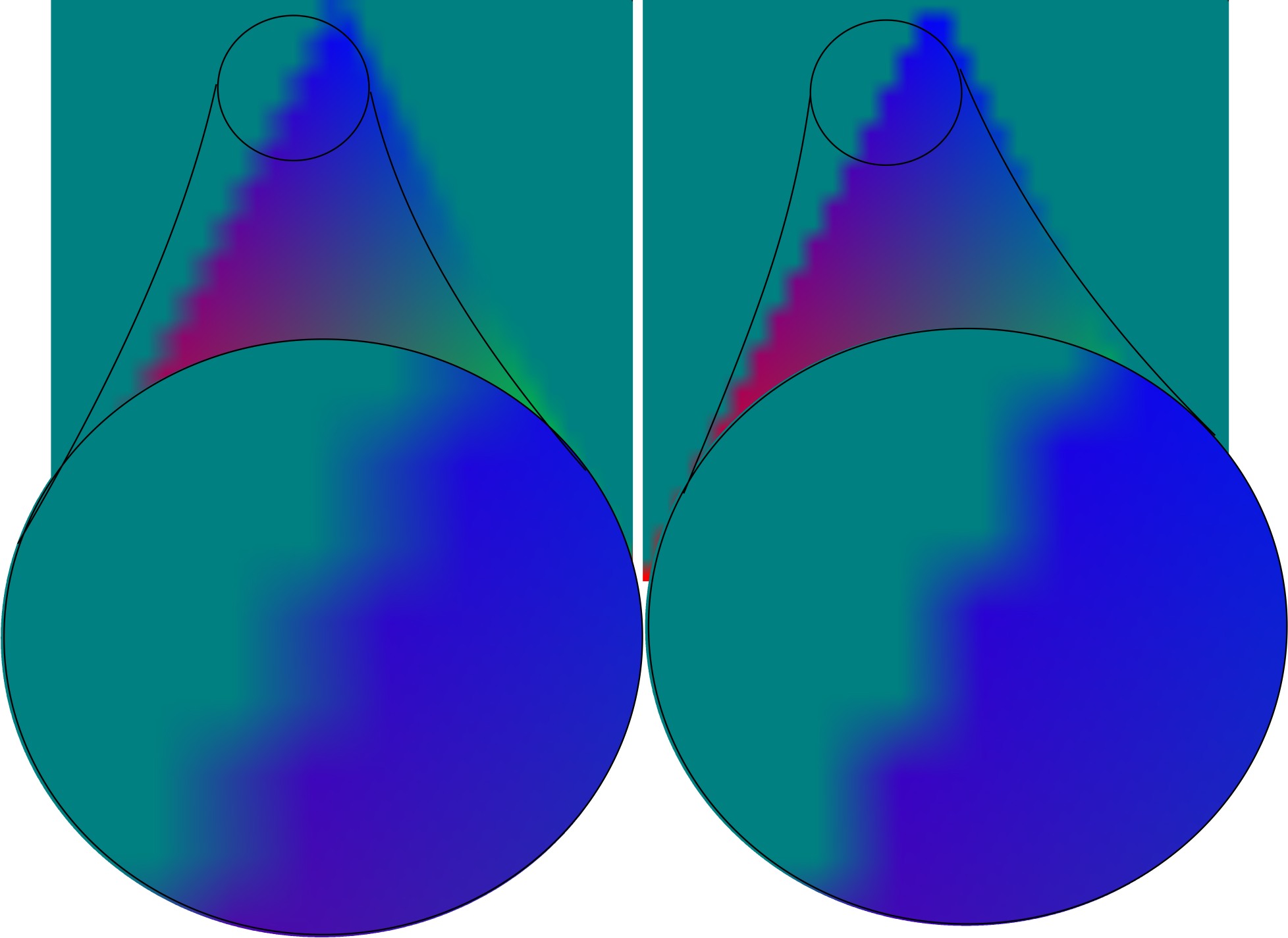
Multisampled Triangle
Comparison of with and without 4 stage multsampling (Left is with 4 stage multisampling, while Right is without).
Functions Used: getContext(), requestAdapter(), getPreferredCanvasFormat(), createCommandEncoder(), beginRenderPass(), setPipeline(), draw(), end(), submit(), getCurrentTexture(), createView(), createShaderModule()
/*
WebGPU Example - Color Multi Sample Triangle Example
GPUMultisampleState describe how a GPURenderPipeline interacts with a render pass's multisampled attachments.
Example uses sample count of 4
*/
const sampleCount = 4 ; // change from 1 to 4 to see the effect
let canvas = document . createElement ( 'canvas' );
document . body . appendChild ( canvas );
canvas . width = canvas . height = 32 ;
canvas . style . width = '512px' ;
canvas . style . height = '512px' ;
const adapter = await navigator . gpu . requestAdapter ();
const device = await adapter . requestDevice ();
const context = canvas . getContext ( 'webgpu' );
const presentationSize = [ canvas . width ,
canvas . height ]
const presentationFormat = navigator . gpu . getPreferredCanvasFormat ();
context . configure ({ device : device ,
alphaMode : 'premultiplied' ,
format : presentationFormat ,
size : presentationSize });
const vertWGSL = `
struct VSOut {
@builtin(position) Position: vec4<f32>,
@location(0) color : vec3<f32>,
};
@vertex
fn main(@location(0) inPos : vec3<f32>,
@location(1) inColor: vec3<f32>) -> VSOut
{
var vsOut: VSOut;
vsOut.Position = vec4<f32>(inPos, 1.0);
vsOut.color = inColor;
return vsOut;
}
`;
const fragWGSL = `
@fragment
fn main(@location(0) inColor: vec3<f32>) -> @location(0) vec4<f32>
{
return vec4<f32>(inColor, 1.0);
}
`;
const positions = new Float32Array ([- 1.0 , - 1.0 , 0.0 , // Position Vertex Buffer Data
1.0 , - 1.0 , 0.0 ,
0.0 , 1.0 , 0.0 ]);
const colors = new Float32Array ([ 1.0 , 0.0 , 0.0 , // Color Vertex Buffer Data
0.0 , 1.0 , 0.0 ,
0.0 , 0.0 , 1.0 ]);
const indices = new Uint16Array ( [ 0 , 1 , 2 ]); // Index Buffer Data
const createBuffer = ( arrData , usage ) => {
const buffer = device . createBuffer ({ size : (( arrData . byteLength + 3 ) & ~ 3 ),
usage : usage ,
mappedAtCreation : true });
if ( arrData instanceof Float32Array )
{ (new Float32Array ( buffer . getMappedRange ())). set ( arrData ) }
else
{ (new Uint16Array ( buffer . getMappedRange ())). set ( arrData ) }
buffer . unmap ();
return buffer ;
}
// Declare buffer handles (GPUBuffer)
var positionBuffer = createBuffer ( positions , GPUBufferUsage . VERTEX );
var colorBuffer = createBuffer ( colors , GPUBufferUsage . VERTEX );
var indexBuffer = createBuffer ( indices , GPUBufferUsage . INDEX );
const pipeline = device . createRenderPipeline ({
layout : 'auto' ,
vertex : { module : device . createShaderModule ({ code : vertWGSL }),
entryPoint : 'main' ,
buffers : [ { arrayStride : 12 , attributes : [{ shaderLocation : 0 ,
format : "float32x3" ,
offset : 0 }] },
{ arrayStride : 12 , attributes : [{ shaderLocation : 1 ,
format : "float32x3" ,
offset : 0 }] }
]
},
fragment : { module : device . createShaderModule ({ code : fragWGSL }),
entryPoint : 'main' ,
targets : [ { format : presentationFormat } ],
},
primitive : {
topology : "triangle-list" ,
cullMode : 'back'
},
multisample : {
count : sampleCount ,
},
});
var resolveTarget = undefined ;
var view = undefined ;
if ( sampleCount > 1 )
{
const outtexture = device . createTexture ({
size : [ canvas . width , canvas . height ],
sampleCount : sampleCount ,
format : presentationFormat ,
usage : GPUTextureUsage . RENDER_ATTACHMENT ,
});
view = outtexture . createView ();
resolveTarget = context . getCurrentTexture (). createView ();
}
else
{
view = context . getCurrentTexture (). createView ();
}
function frame ()
{
const renderPassDescription = {
colorAttachments : [{
view : view ,
resolveTarget : resolveTarget ,
loadOp : "clear" , clearValue : [ 0 , 0.5 , 0.5 , 1 ], // clear screen to color
storeOp : 'store'
}],
};
//renderPassDescription.colorAttachments[0].view = outview; // context.getCurrentTexture().createView();
const commandEncoder = device . createCommandEncoder ();
const renderPass = commandEncoder . beginRenderPass ( renderPassDescription );
renderPass . setPipeline ( pipeline );
renderPass . setVertexBuffer ( 0 , positionBuffer );
renderPass . setVertexBuffer ( 1 , colorBuffer );
renderPass . setIndexBuffer ( indexBuffer , 'uint16' );
renderPass . drawIndexed ( 3 , 1 );
renderPass . end ();
device . queue . submit ([ commandEncoder . finish ()]);
}
frame ();
// only update when moving the mouse (modified to update all time)
onmousemove = function() {
frame ();
}
console . log ( 'ready...' );
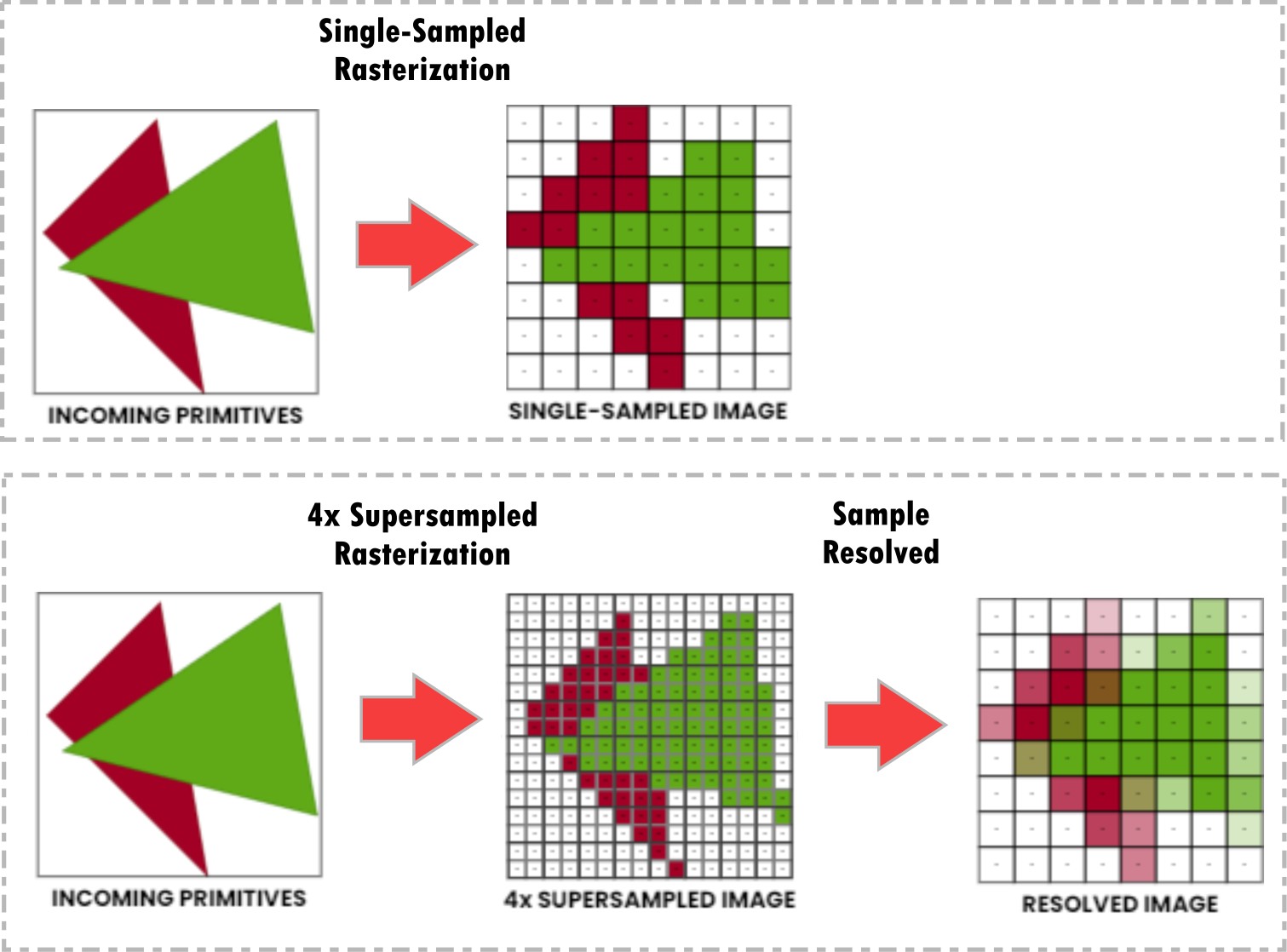
Visualization of how supersampling works on image edges.
Resources & Links
LINK ]