 | Normals |  |
Normals are a vital concept in computer graphics - essentially the direction the surface is facing. It's used for culling and lighting.
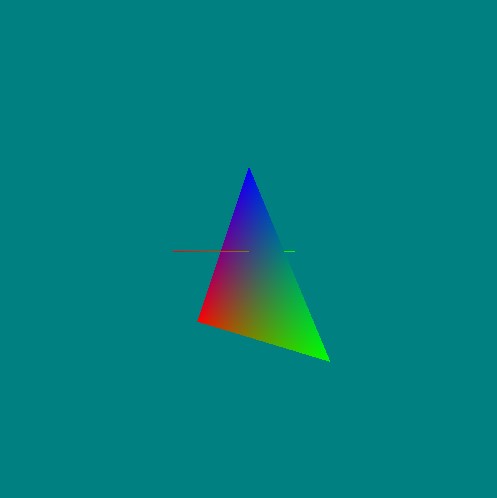 Single triangle provides a point of references for our camera - as we move around we see the triangle moving. Single triangle provides a point of references for our camera - as we move around we see the triangle moving.
Functions Used: setVertexBuffer(), setIndexBuffer(), drawIndexed(), createBuffer(), getMappedRange(), getContext(), requestAdapter(), getPreferredCanvasFormat(), createCommandEncoder(), beginRenderPass(), setPipeline(), draw(), end(), submit(), getCurrentTexture(), createView(), createShaderModule()
To visualize the normal we draw a line on the triangle surface - the line is in its own function object called 'lines'.
<?php
lines = function()
{

this.create = function(device,presentationFormat)
{
    const vertWGSL = `
    struct Transforms {
        model      : mat4x4<f32>,
        view       : mat4x4<f32>,
        projection : mat4x4<f32>,
    };
    @group(0) @binding(0) var<uniform> transforms : Transforms;

    struct VSOut {
        @builtin(position) Position: vec4<f32>,
        @location(0)       color   : vec3<f32>,
    };

    @vertex
    fn main(@location(0) inPos  : vec3<f32>,
            @location(1) inColor: vec3<f32>) -> VSOut
    {
        var mvp = transforms.projection * transforms.view * transforms.model;

        var vsOut: VSOut;
        vsOut.Position = mvp * vec4<f32>(inPos, 1.0);
        vsOut.color    = inColor;
        return vsOut;
    }
    `;

    const fragWGSL = `
    @fragment
    fn main(@location(0) inColor: vec3<f32>) -> @location(0) vec4<f32>
    {
        return vec4<f32>(inColor, 1.0);
    }
    `;

    const positions = new Float32Array([0.0, 0.0,  1.0,   // Position Vertex Buffer Data
                                        0.0, 0.0, -1.0 ]);
    const colors    = new Float32Array([ 1.0, 0.0, 0.0,    // Color Vertex Buffer Data
                                         0.0, 1.0, 0.0 ]);
    const indices   = new Uint16Array( [ 0, 1 ]);       // Index Buffer Data

    const createBuffer = (arrData, usage) => {
      const buffer = device.createBuffer({ size            : ((arrData.byteLength + 3) & ~3),
                                           usage           : usage,
                                           mappedAtCreation: true  });
      if ( arrData instanceof Float32Array )
      { (new Float32Array(buffer.getMappedRange())).set(arrData) }
      else
      { (new Uint16Array (buffer.getMappedRange())).set(arrData) }
      buffer.unmap();
      return buffer;
    }

    // Declare buffer handles (GPUBuffer)
    this.positionBuffer = createBuffer(positions, GPUBufferUsage.VERTEX);
    this.colorBuffer    = createBuffer(colors,    GPUBufferUsage.VERTEX);
    this.indexBuffer    = createBuffer(indices,   GPUBufferUsage.INDEX);

    // ----------------------------------------------------------------

    this.mvpUniformBuffer = device.createBuffer({
      size: 64*3,
      usage: GPUBufferUsage.UNIFORM | GPUBufferUsage.COPY_DST
    });

    // ----------------------------------------------------------------

    this.sceneUniformBindGroupLayout = device.createBindGroupLayout({
      entries: [  { binding: 0, visibility: GPUShaderStage.VERTEX,   buffer:  { type: "uniform"  }   }
               ]
    });

    this.uniformBindGroup = device.createBindGroup({
      layout:   this.sceneUniformBindGroupLayout,
      entries: [  { binding : 0, resource: { buffer: this.mvpUniformBuffer        } }
               ],
    });

    // ----------------------------------------------------------------

    this.pipeline = device.createRenderPipeline({
      layout: device.createPipelineLayout({bindGroupLayouts: [this.sceneUniformBindGroupLayout]}),
      vertex:    { module     : device.createShaderModule({code   : vertWGSL }),
                   entryPoint : 'main',
                   buffers    : [ { arrayStride: 12, attributes: [{ shaderLocation: 0,format: "float32x3",offset: 0  }]         },
                                  { arrayStride: 12, attributes: [{ shaderLocation: 1,format: "float32x3",offset: 0  }]         }
        ]
      },
      fragment:  { module     : device.createShaderModule({ code  : fragWGSL }),
                   entryPoint : 'main',
                   targets    : [ {format: presentationFormat } ],
      },
      primitive: {
        topology: "line-list",
        frontFace: "cw",
        cullMode: 'none'
      },
      depthStencil: {
        format: "depth24plus",
        depthWriteEnabled: true,
        depthCompare: "less"
      }
    });
}
// -----------------------------------------------------

this.draw = function( device, context, depthTexture, modelMatrix, viewMatrix, projectionMatrix)
{
    device.queue.writeBuffer(this.mvpUniformBuffer,      0,      modelMatrix);
    device.queue.writeBuffer(this.mvpUniformBuffer,      64,     viewMatrix);
    device.queue.writeBuffer(this.mvpUniformBuffer,      128,    projectionMatrix);

    const renderPassDescription = {
      colorAttachments: [{
        view: context.getCurrentTexture().createView(),
        loadOp: 'load', // (k==0 ? "clear":"load"),
        clearValue: [0, 0.5, 0.5, 1], // clear screen to color
        storeOp: 'store'
      }],
      depthStencilAttachment: {
        view: depthTexture.createView(),
        depthLoadOp: 'load', // (k==0 ? "clear":"load"),
        depthClearValue: 1,
        depthStoreOp: "store",
      }
    };

    renderPassDescription.colorAttachments[0].view = context.getCurrentTexture().createView();
      const commandEncoder = device.createCommandEncoder();
      const renderPass = commandEncoder.beginRenderPass(renderPassDescription);

    renderPass.setBindGroup(0, this.uniformBindGroup);
    renderPass.setPipeline(this.pipeline);
    renderPass.setVertexBuffer(0, this.positionBuffer);
    renderPass.setVertexBuffer(1, this.colorBuffer);
    renderPass.setIndexBuffer(this.indexBuffer, 'uint16');
    renderPass.drawIndexed(2,1);
    renderPass.end();
    device.queue.submit([commandEncoder.finish()]);
}


}// end lines
The body of the code that draws the rotating triangle:
<?php
let promise      = await fetch('https://cdnjs.cloudflare.com/ajax/libs/gl-matrix/2.6.0/gl-matrix-min.js');
let text         = await promise.text();
let script       = document.createElement('script');
script.type      = 'text/javascript';
script.async     = false;
script.innerHTML = text;
document.body.appendChild(script);

let canvas = document.createElement('canvas');
document.body.appendChild( canvas );
canvas.width  = canvas.height = 512;

const adapter = await navigator.gpu.requestAdapter();
const device  = await adapter.requestDevice();
const context = canvas.getContext('webgpu');

const presentationSize   = [ canvas.width,
                             canvas.height ]

const presentationFormat = navigator.gpu.getPreferredCanvasFormat();

context.configure({ device : device, compositingAlphaMode: "opaque", compositingAlphaMode: "opaque",
                    format : presentationFormat,
                    size   : presentationSize });
const vertWGSL = `
struct Transforms {
    model      : mat4x4<f32>,
    view       : mat4x4<f32>,
    projection : mat4x4<f32>,
};
@group(0) @binding(0) var<uniform> transforms : Transforms;

struct VSOut {
    @builtin(position) Position: vec4<f32>,
    @location(0)       color   : vec3<f32>,
};

@vertex
fn main(@location(0) inPos  : vec3<f32>,
        @location(1) inColor: vec3<f32>) -> VSOut
{
    var mvp = transforms.projection * transforms.view * transforms.model;

    var vsOut: VSOut;
    vsOut.Position = mvp * vec4<f32>(inPos, 1.0);
    vsOut.color    = inColor;
    return vsOut;
}
`;

const fragWGSL = `
@fragment
fn main(@location(0) inColor: vec3<f32>) -> @location(0) vec4<f32>
{
    return vec4<f32>(inColor, 1.0);
}
`;

const positions = new Float32Array([-1.0, -1.0, 0.0,   // Position Vertex Buffer Data
                                     1.0, -1.0, 0.0,
                                     0.0,  1.0, 0.0 ]);
const colors    = new Float32Array([ 1.0, 0.0, 0.0,    // Color Vertex Buffer Data
                                     0.0, 1.0, 0.0,
                                     0.0, 0.0, 1.0  ]);
const indices   = new Uint16Array( [ 0, 1, 2 ]);       // Index Buffer Data

const createBuffer = (arrData, usage) => {
  const buffer = device.createBuffer({ size            : ((arrData.byteLength + 3) & ~3),
                                       usage           : usage,
                                       mappedAtCreation: true  });
  if ( arrData instanceof Float32Array )
  { (new Float32Array(buffer.getMappedRange())).set(arrData) }
  else
  { (new Uint16Array (buffer.getMappedRange())).set(arrData) }
  buffer.unmap();
  return buffer;
}

// Declare buffer handles (GPUBuffer)
var positionBuffer = createBuffer(positions, GPUBufferUsage.VERTEX);
var colorBuffer    = createBuffer(colors,    GPUBufferUsage.VERTEX);
var indexBuffer    = createBuffer(indices,   GPUBufferUsage.INDEX);

// ----------------------------------------------------------------

function buildMatrix( p, r, s ) // position, rotation, scale
{
    // if not set fall back to default values
    if (!s) s = {x:1, y:1, z:1};
    if (!r) r = {x:0, y:0, z:0};
    if (!p) p = {x:0, y:0, z:0};

    // Create the matrix in Javascript (using matrix library)
    const modelMatrix          = mat4.create();

    // create the model transform with a rotation and translation
    let translateMat = mat4.create();   mat4.fromTranslation( translateMat, Object.values(p) );
    let rotateXMat   = mat4.create();   mat4.fromXRotation(rotateXMat, r.x);
    let rotateYMat   = mat4.create();   mat4.fromYRotation(rotateYMat, r.y);
    let rotateZMat   = mat4.create();   mat4.fromZRotation(rotateZMat, r.z);
    let scaleMat     = mat4.create();   mat4.fromScaling(scaleMat, Object.values(s) );

    mat4.multiply(modelMatrix, modelMatrix,   translateMat);
    mat4.multiply(modelMatrix, modelMatrix,   rotateXMat);
    mat4.multiply(modelMatrix, modelMatrix,   rotateYMat);
    mat4.multiply(modelMatrix, modelMatrix,   rotateZMat);
    mat4.multiply(modelMatrix, modelMatrix,   scaleMat);
    return modelMatrix;
}

// build a model matrix (scale, rotate and position it wherever we want)
let modelMatrix = buildMatrix();

// setup the projection
let projectionMatrix = mat4.create();
mat4.perspective(projectionMatrix, Math.PI / 2, canvas.width / canvas.height, 0.001, 5000.0);

// default camera `lookat` - camera is at -4 units down the z-axis looking at '0,0,0'
let viewMatrix = mat4.create();
mat4.lookAt(viewMatrix, [0,0,-4],  [0,0,0], [0, 1, 0]);


let mvpUniformBuffer = device.createBuffer({
  size: 64*3,
  usage: GPUBufferUsage.UNIFORM | GPUBufferUsage.COPY_DST
});

device.queue.writeBuffer(mvpUniformBuffer,      0,      modelMatrix);
device.queue.writeBuffer(mvpUniformBuffer,      64,     viewMatrix);
device.queue.writeBuffer(mvpUniformBuffer,      128,    projectionMatrix);

// ----------------------------------------------------------------

let sceneUniformBindGroupLayout = device.createBindGroupLayout({
  entries: [
    { binding: 0, visibility: GPUShaderStage.VERTEX,   buffer:  { type: "uniform"  }   }
  ]
});

let uniformBindGroup = device.createBindGroup({
  layout:   sceneUniformBindGroupLayout,
  entries: [
    { binding : 0, resource: { buffer: mvpUniformBuffer        } }
   ],
});

// ----------------------------------------------------------------

const pipeline = device.createRenderPipeline({
  layout: device.createPipelineLayout({bindGroupLayouts: [sceneUniformBindGroupLayout]}),
  vertex:    { module     : device.createShaderModule({code   : vertWGSL }),
               entryPoint : 'main',
               buffers    : [ { arrayStride: 12, attributes: [{ shaderLocation: 0,
                                                                format: "float32x3",
                                                                offset: 0  }]         },
                              { arrayStride: 12, attributes: [{ shaderLocation: 1,
                                                                format: "float32x3",
                                                                offset: 0  }]         }
    ]
  },
  fragment:  { module     : device.createShaderModule({ code  : fragWGSL }),
               entryPoint : 'main',
               targets    : [ {format: presentationFormat } ],
  },
  primitive: {
    topology: "triangle-list",
    frontFace: "cw",
    cullMode: 'none'
  },
  depthStencil: {
    format: "depth24plus",
    depthWriteEnabled: true,
    depthCompare: "less"
  }
});

const depthTexture = device.createTexture({
  size: [canvas.width, canvas.height, 1],
  format: "depth24plus",
  usage:  GPUTextureUsage.RENDER_ATTACHMENT
})

// ---------------

let line = new lines();
line.create(device,presentationFormat);


let counter = 0.0;

function frame()
{


  // setup a transform for each triangle
  let tris = [  { p:{x:0,y:0,z:0}, r:{x:0,y:0.0,z:0.0}, s:{x:1.0, y:1.0,z:1.0} } ];

  // loop over each triangle and render it
  //tris.forEach( (t,k)=>{
  let t = tris[0];
  let k = 0;

    let modelMatrix = buildMatrix(t.p, t.r, t.s);
    // update the local matrix for each triangle draw differently
    device.queue.writeBuffer(mvpUniformBuffer,      0,      modelMatrix);

    // Rotate the camera around the origin in the circle
    let cameraEye = [ Math.cos(counter)*3.0, 0.0, Math.sin(counter)*3.0 ];
    mat4.lookAt(viewMatrix, cameraEye,  [0,0,0], [0, 1, 0]);
    device.queue.writeBuffer(mvpUniformBuffer,      64,     viewMatrix);

    // simple counter
    counter += 0.001;


    const renderPassDescription = {
      colorAttachments: [{
        view: context.getCurrentTexture().createView(),
        loadOp: (k==0 ? "clear":"load"),
        clearValue: [0, 0.5, 0.5, 1], // clear screen to color
        storeOp: 'store'
      }],
      depthStencilAttachment: {
        view: depthTexture.createView(),
        depthLoadOp: (k==0 ? "clear":"load"),
        depthClearValue: 1,
        depthStoreOp: "store",
      }
    };

    renderPassDescription.colorAttachments[0].view = context.getCurrentTexture().createView();
      const commandEncoder = device.createCommandEncoder();
      const renderPass = commandEncoder.beginRenderPass(renderPassDescription);

    renderPass.setBindGroup(0, uniformBindGroup);
    renderPass.setPipeline(pipeline);
    renderPass.setVertexBuffer(0, positionBuffer);
    renderPass.setVertexBuffer(1, colorBuffer);
    renderPass.setIndexBuffer(indexBuffer, 'uint16');
    renderPass.drawIndexed(3,1);
    renderPass.end();
    device.queue.submit([commandEncoder.finish()]);

  //});

  line.draw(device, context, depthTexture, modelMatrix, viewMatrix, projectionMatrix );

  // animate - keep updating
  requestAnimationFrame(frame);
}

frame();


console.log('ready...');
| Resources and Links | |
• WebGPU Lab Example [LINK]












|




