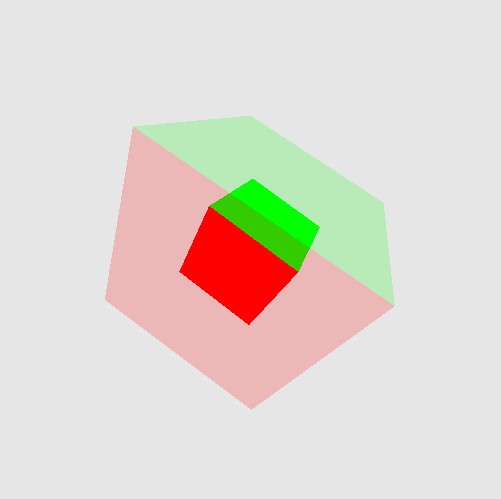
Transparent Cubes
Cube inside a cube (with the outer cube transparent).
Functions Used: setVertexBuffer(), setIndexBuffer(), drawIndexed(), createBuffer(), getMappedRange(), getContext(), requestAdapter(), getPreferredCanvasFormat(), createCommandEncoder(), beginRenderPass(), setPipeline(), draw(), end(), submit(), getCurrentTexture(), createView(), createShaderModule()
// Load matrix library on dynamically (on-the-fly)
let matprom = await fetch ( 'https://cdnjs.cloudflare.com/ajax/libs/gl-matrix/2.6.0/gl-matrix-min.js' );
let mattex = await matprom . text ();
var script = document . createElement ( 'script' );
script . type = 'text/javascript' ;
script . innerHTML = mattex ;
document . head . appendChild ( script );
const canvas = document . createElement ( 'canvas' );
document . body . appendChild ( canvas );
canvas . width = canvas . height = 512 ;
const gpu = navigator . gpu ;
console . log ( 'navigator.gpu:' , gpu );
const adapter = await gpu . requestAdapter ();
const device = await adapter . requestDevice ();
const context = canvas . getContext ( 'webgpu' );
const presentationFormat = navigator . gpu . getPreferredCanvasFormat (); // context. getPreferredFormat(adapter); - no longer supported
context . configure ({
device ,
format : presentationFormat ,
alphaMode : 'premultiplied' , /* IMPORTANT IMPORTANT - vs default opacity */
});
////////////////////////////////////////
// Create vertex buffers and load data
////////////////////////////////////////
function createCube ()
{
// unit cube
const cubeVertexArray = new Float32Array ([
// position, color
1 , - 1 , 1 , 1 , 0 , 0 ,
- 1 , - 1 , 1 , 1 , 0 , 0 ,
- 1 , - 1 , - 1 , 1 , 0 , 0 ,
1 , - 1 , - 1 , 1 , 0 , 0 ,
1 , - 1 , 1 , 1 , 0 , 0 ,
- 1 , - 1 , - 1 , 1 , 0 , 0 ,
1 , 1 , 1 , 0 , 1 , 0 ,
1 , - 1 , 1 , 0 , 1 , 0 ,
1 , - 1 , - 1 , 0 , 1 , 0 ,
1 , 1 , - 1 , 0 , 1 , 0 ,
1 , 1 , 1 , 0 , 1 , 0 ,
1 , - 1 , - 1 , 0 , 1 , 0 ,
- 1 , 1 , 1 , 0 , 0 , 1 ,
1 , 1 , 1 , 0 , 0 , 1 ,
1 , 1 , - 1 , 0 , 0 , 1 ,
- 1 , 1 , - 1 , 0 , 0 , 1 ,
- 1 , 1 , 1 , 0 , 0 , 1 ,
1 , 1 , - 1 , 0 , 0 , 1 ,
- 1 , - 1 , 1 , 1 , 1 , 0 ,
- 1 , 1 , 1 , 1 , 1 , 0 ,
- 1 , 1 , - 1 , 1 , 1 , 0 ,
- 1 , - 1 , - 1 , 1 , 1 , 0 ,
- 1 , - 1 , 1 , 1 , 1 , 0 ,
- 1 , 1 , - 1 , 1 , 1 , 0 ,
1 , 1 , 1 , 1 , 0 , 1 ,
- 1 , 1 , 1 , 1 , 0 , 1 ,
- 1 , - 1 , 1 , 1 , 0 , 1 ,
- 1 , - 1 , 1 , 1 , 0 , 1 ,
1 , - 1 , 1 , 1 , 0 , 1 ,
1 , 1 , 1 , 1 , 0 , 1 ,
1 , - 1 , - 1 , 0 , 1 , 1 ,
- 1 , - 1 , - 1 , 0 , 1 , 1 ,
- 1 , 1 , - 1 , 0 , 1 , 1 ,
1 , 1 , - 1 , 0 , 1 , 1 ,
1 , - 1 , - 1 , 0 , 1 , 1 ,
- 1 , 1 , - 1 , 0 , 1 , 1 ,
]);
const gpuBuffer = device . createBuffer ({ size : cubeVertexArray . byteLength ,
usage : GPUBufferUsage . VERTEX | GPUBufferUsage . COPY_DST });
device . queue . writeBuffer ( gpuBuffer , 0 , cubeVertexArray );
return { buffer : gpuBuffer , numVertices : 36 , stride : 6 * 4 };
}
// --------------------------------------------------------------------------
let basicVertWGSL = `
@group(0) @binding(0) var<uniform> timer : f32;
struct Transforms {
model : mat4x4<f32>,
view : mat4x4<f32>,
projection : mat4x4<f32>,
};
@group(0) @binding(1) var<uniform> transforms : Transforms;
struct VertexOutput {
@builtin(position) Position : vec4<f32>,
@location(0) fragColor : vec3<f32>
};
@vertex
fn main(@location(0) position : vec3<f32>,
@location(1) color : vec3<f32>) -> VertexOutput {
var mvp = transforms.projection * transforms.view * transforms.model;
var output : VertexOutput;
output.Position = mvp * vec4<f32>(position, 1.0);
output.fragColor = color;
return output;
}
`;
let = basicPixelWGSL = `
@group(0) @binding(2) var<uniform> alpha : f32;
@fragment
fn main(@location(0) fragColor: vec3<f32>) -> @location(0) vec4<f32> {
return vec4<f32>(fragColor, alpha);
// if you want a 'constant' color for the shape
// return vec4<f32>(1.0, 0.0, 0.0, 1.0);
}
`;
// ----------------------------------------------------------------
function buildMatrix ( p , r , s ) // position, rotation, scale
{
// if not set fall back to default values
if (! s ) s = { x : 1 , y : 1 , z : 1 };
if (! r ) r = { x : 0 , y : 0 , z : 0 };
if (! p ) p = { x : 0 , y : 0 , z : 0 };
// Create the matrix in Javascript (using matrix library)
const modelMatrix = mat4 . create ();
// create the model transform with a rotation and translation
let translateMat = mat4 . create (); mat4 . fromTranslation ( translateMat , Object . values ( p ) );
let rotateXMat = mat4 . create (); mat4 . fromXRotation ( rotateXMat , r . x );
let rotateYMat = mat4 . create (); mat4 . fromYRotation ( rotateYMat , r . y );
let rotateZMat = mat4 . create (); mat4 . fromZRotation ( rotateZMat , r . z );
let scaleMat = mat4 . create (); mat4 . fromScaling ( scaleMat , Object . values ( s ) );
mat4 . multiply ( modelMatrix , modelMatrix , translateMat );
mat4 . multiply ( modelMatrix , modelMatrix , rotateXMat );
mat4 . multiply ( modelMatrix , modelMatrix , rotateYMat );
mat4 . multiply ( modelMatrix , modelMatrix , rotateZMat );
mat4 . multiply ( modelMatrix , modelMatrix , scaleMat );
return modelMatrix ;
}
// build a model matrix (scale, rotate and position it wherever we want)
let modelMatrix = buildMatrix ();
// setup the projection
let projectionMatrix = mat4 . create ();
mat4 . perspective ( projectionMatrix , Math . PI / 2 , canvas . width / canvas . height , 0.001 , 500.0 );
// default camera `lookat` - camera is at -4 units down the z-axis looking at '0,0,0'
let viewMatrix = mat4 . create ();
mat4 . lookAt ( viewMatrix , [ 0 , 0 ,- 3.0 ], [ 0 , 0 , 0 ], [ 0 , 1 , 0 ]);
let mvpUniformBuffer = device . createBuffer ({
size : 64 * 3 ,
usage : GPUBufferUsage . UNIFORM | GPUBufferUsage . COPY_DST
});
device . queue . writeBuffer ( mvpUniformBuffer , 0 , modelMatrix );
device . queue . writeBuffer ( mvpUniformBuffer , 64 , viewMatrix );
device . queue . writeBuffer ( mvpUniformBuffer , 128 , projectionMatrix );
// ----------------------------------------------------------------
const timerUniformBuffer = device . createBuffer ({ size : 4 , // single float for the timer
usage : GPUBufferUsage . UNIFORM | GPUBufferUsage . COPY_DST });
let timeData = new Float32Array ( [ 0.0 ]);
device . queue . writeBuffer ( timerUniformBuffer , 0 , timeData );
// ----------------------------------------------------------------
const alphaUniformBuffer = device . createBuffer ({ size : 4 , // single float for the timer
usage : GPUBufferUsage . UNIFORM | GPUBufferUsage . COPY_DST });
let alphaData = new Float32Array ( [ 1.0 ]);
device . queue . writeBuffer ( alphaUniformBuffer , 0 , alphaData );
// ----------------------------------------------------------------
const sceneUniformBindGroupLayout = device . createBindGroupLayout ({
entries : [ { binding : 0 , visibility : GPUShaderStage . VERTEX , buffer : { type : "uniform" } },
{ binding : 1 , visibility : GPUShaderStage . VERTEX , buffer : { type : "uniform" } },
{ binding : 2 , visibility : GPUShaderStage . FRAGMENT , buffer : { type : "uniform" } },
]
});
const sceneUniformBindGroup = device . createBindGroup ({
layout : sceneUniformBindGroupLayout ,
entries : [ { binding : 0 , resource : { buffer : timerUniformBuffer } },
{ binding : 1 , resource : { buffer : mvpUniformBuffer } },
{ binding : 2 , resource : { buffer : alphaUniformBuffer } },
]
});
// ----------------------------------------------------------------
let cubeData = createCube ();
// ----------------------------------------------------------------
const pipeline = device . createRenderPipeline ({
layout : device . createPipelineLayout ({ bindGroupLayouts : [ sceneUniformBindGroupLayout ]}),
vertex : {
module : device . createShaderModule ({
code : basicVertWGSL
}),
entryPoint : "main" ,
buffers : [ { arrayStride : cubeData . stride ,
attributes : [ { shaderLocation : 0 , offset : 0 , format : 'float32x3' }, // position
{ shaderLocation : 1 , offset : 3 * 4 , format : 'float32x3' } // color
] } ]
},
fragment : {
module : device . createShaderModule ({ code : basicPixelWGSL }),
entryPoint : "main" ,
targets : [{ format : presentationFormat ,
blend : { color : { srcFactor : 'src-alpha' , dstFactor : "one-minus-src-alpha" , operation : "add" },
alpha : { srcFactor : 'one' , dstFactor : "one" , operation : "add" } }
}]
},
primitive : {
topology : "triangle-list" ,
cullMode : 'back'
},
depthStencil : {
format : "depth24plus" ,
depthWriteEnabled : true ,
depthCompare : "less"
}
});
const depthTexture = device . createTexture ({
size : [ canvas . width , canvas . height , 1 ],
format : "depth24plus" ,
usage : GPUTextureUsage . RENDER_ATTACHMENT
})
let rotation = { x : 0 , y : 0 , z : 0 };
function draw () {
// update uniform buffer
timeData [ 0 ] += 0.005 ;
device . queue . writeBuffer ( timerUniformBuffer , 0 , timeData );
// Draw 2 cubes - on inside the other
for ( let k = 0 ; k < 2 ; k ++)
{
// update rotation on local cube
rotation . x += 0.02 ;
rotation . y += 0.03 ;
rotation . z += 0.01 ;
let scale = { x : 1 , y : 1 , z : 1 };
if ( k == 0 )
{
alphaData [ 0 ] = 1.0 ;
scale . x = scale . y = scale . z = 0.5 ;
}
if ( k == 1 )
{
alphaData [ 0 ] = 0.2 ;
scale . x = scale . y = scale . z = 1.0 ;
}
device . queue . writeBuffer ( alphaUniformBuffer , 0 , alphaData );
modelMatrix = buildMatrix ( null , rotation , scale );
device . queue . writeBuffer ( mvpUniformBuffer , 0 , modelMatrix );
const renderPassDescription = {
colorAttachments : [{
view : context . getCurrentTexture (). createView (),
loadOp : ( k == 0 ? "clear" : "load" ),
clearValue : [ 0.9 , 0.9 , 0.9 , 1 ], // clear screen color
storeOp : 'store'
}],
depthStencilAttachment : {
view : depthTexture . createView (),
depthLoadOp : ( k == 0 ? "clear" : "load" ),
depthClearValue : 1 ,
depthStoreOp : "store" ,
}
};
renderPassDescription . colorAttachments [ 0 ]. view = context . getCurrentTexture (). createView ();
const commandEncoder = device . createCommandEncoder ();
const renderPass = commandEncoder . beginRenderPass ( renderPassDescription );
renderPass . setPipeline ( pipeline );
renderPass . setVertexBuffer ( 0 , cubeData . buffer );
renderPass . setBindGroup ( 0 , sceneUniformBindGroup );
renderPass . draw ( cubeData . numVertices , 1 , 0 , 0 );
renderPass . end ();
device . queue . submit ([ commandEncoder . finish ()]);
}
requestAnimationFrame ( draw );
};
draw ();
Resources and Links
LINK ]