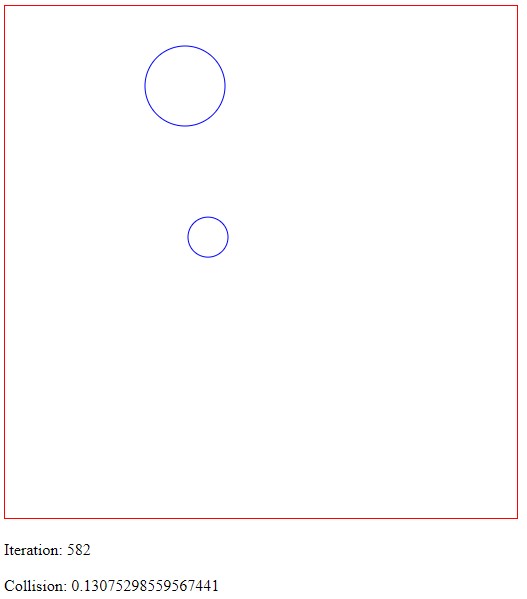
Teaching neural network to detect the collision (intersection of two objects).
• Neural network (6,12,12,1) - obj1(x,y) and radius (r1), obj2(x,y) and radius (r2)
Output for the collision detection neural network example (checks intersection of two sphere - one sphere is able to be moved around using the mouse cursor.)
Complete Code
// Collision Detection Objects (Using Neural Network)
await xinitialize( {layers:[6,12,12,1], build:'cpu', learningrate:0.2} );

let div = document.createElement('div');
document.body.appendChild( div );
div.innerHTML = `
<h1 align='center'>Collision Detection - Learning Neural Network</h1>
<br><br>
<canvas id="mycanvas" width="512" height="512" style="border:1px solid #ff0000;"> </canvas>
<br><br>
<div id="counter">Iteration:</div>
<br>
<div id="result">Collision:</div>
`;

var canvas      = null;
var context     = null;
var iteration   = 0;
var mousePos    = [ 100, 100 ];
var col         = "blue";
var testSphere = [ [200,100], 40 ]; // pos,radius

document.onmousemove = handleMouseMove;
function handleMouseMove(event) {
    event = event || window.event; // IE-ism

    canvas    = canvas || document.getElementById('mycanvas');
    context   = context || canvas.getContext('2d');
    var rect = canvas.getBoundingClientRect();

    mousePos  = [event.clientX - rect.left, event.clientY - rect.top];
}

function drawCircle( pos, r, col )
{
    canvas    = canvas || document.getElementById('mycanvas');
    context   = context || canvas.getContext('2d');

    context.fillStyle = "#000ff0";
    // arc(x, y, radius, startAngle, endAngle, anticlockwise)
    context.strokeStyle = col;
    context.beginPath();
    context.arc(pos[0]-r*0.5, pos[1]-r*0.5, r, 0, Math.PI * 2, true);
    context.stroke(); // Draws the Circle.
}


function checkCollision( posA, radA, posB, radB )
{
    let dist =  Math.sqrt( Math.pow( posA[0]-posB[0],2 ) + Math.pow( posA[1]-posB[1],2 ) );

    if ( dist < (radA + radB) )
    {
        return 1;
    }
    return 0;
}

async function preview(){
    // check if data/images is still loading
    if ( mousePos.length < 2 )
    {
        requestAnimationFrame(preview);
        return;
    }
    iteration++;

    var elem = document.getElementById('counter');
    elem.innerHTML = "Iteration: " + iteration;

    canvas    = canvas || document.getElementById('mycanvas');
    context   = context || canvas.getContext('2d');

    context.clearRect(0, 0, context.canvas.width, context.canvas.height);

    drawCircle( mousePos, 20, col );
    drawCircle( testSphere[0], testSphere[1], col );


    var datain = [ mousePos[0],    mousePos[1],
                   20,
                   testSphere[0][0],   testSphere[0][1],
                   testSphere[1] ];

    for (var i=0; i<datain.length; i++)
    {
        datain[i] = datain[i]/512;
    }
    var dataout = await xactivate( datain );

    elem = document.getElementById('result');
    elem.innerHTML = "Collision: " + dataout[0];

    // draw the shapes in red if your network says their is a collision
    if ( dataout[0] > 0.5 )
    {
        col = "red";
    }
    else
    {
        col = "blue";
    }

    // check our 'checkCollision' function works
    /*
    if ( checkCollision( mousePos[0], mousePos[1], 20,
                         testSphere[0][0], testSphere[0][1],
                         testSphere[1] ) )
     {
     console.log( 'collision ');
     }
     */

    requestAnimationFrame(iterate);
}

/*
 Keep training the neural network to improve its accuracy
 */
async function iterate(){

    for (let r=0; r<1000; ++r)
    {
        let posA = [ Math.random()*512, Math.random()*512 ];
        let radA = Math.random() * 256;

        let posB = [ Math.random()*512, Math.random()*512 ];
        let radB = Math.random() * 256;

        var datain = [ posA[0],    posA[1],
                       radA,
                       posB[0],    posB[1],
                       radB ];

        var dataout = [  checkCollision( posA, radA, posB, radB ) ];

        for (var i=0; i<datain.length; i++)
        {
            datain[i] = datain[i]/512;
        }

        var dynamicRate =  .01/(1+.0005*iteration);
        await xactivate( datain );
        await xpropagate( dataout, dynamicRate );
    }

    preview();
}

preview();
Things to Try
• Try improving the training time (different starting values for the weights and learning rates)
• Try other shapes (axis aligned shapes and orientated shapes, triangles, boxes, hexagons, ...)
• Extra intersection information (peneration distance, contact normal and contact point)