|
|
 |
Neural Networks and WebGPU Compute..
Learning from Data..... |
|
|
|
 | Inverse Kinematics (2 Links) |  |
• Network (6-10-2) - input is base (x,y), end eff pos(x,y), target pos(x,y) and output angles (ang0, ang1)
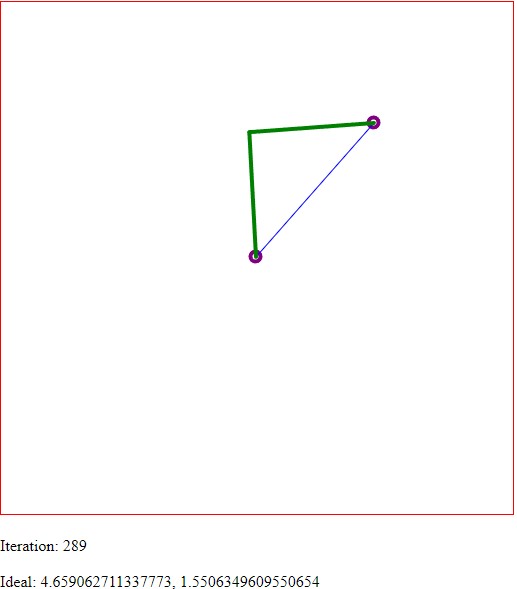 IK output for the neural network - end-effector follows the mouse cursor around the screen. IK output for the neural network - end-effector follows the mouse cursor around the screen.
| Complete Code | |
<?php
await xinitialize( {layers:[6,10,2], build:'cpu', learningrate:0.2} );

let div = document.createElement('div');
document.body.appendChild( div );
div.innerHTML = `
<canvas id="mycanvas" width="512" height="512" style="border:1px solid #ff0000;"> </canvas>
<br><br>
<div id="counter">Iteration:</div>
<br>
<div id="ideal">Analytic Angles:</div>
`;

var canvas      = null;
var context     = null;
var iteration   = 0;
var mousePos    = [];
var centerPos   = [];
var linkAngles  = [0, 0];
var linkLengths = [125, 125];
const PI2         = Math.PI * 2;

document.onmousemove = handleMouseMove;
function handleMouseMove(event) {
    event = event || window.event; // IE-ism

    canvas    = canvas || document.getElementById('mycanvas');
    context   = context || canvas.getContext('2d');
    var rect = canvas.getBoundingClientRect();

    mousePos  = [event.clientX - rect.left, event.clientY - rect.top];
    centerPos = [rect.width*0.5, rect.height*0.5];
}

function drawLine( from, to, col="green", thick=4 )
{
    canvas    = canvas || document.getElementById('mycanvas');
    context   = context || canvas.getContext('2d');

    context.beginPath();
    context.lineWidth = thick;
    context.lineCap = 'round';
    context.strokeStyle = col;
    context.moveTo(from[0]-2, from[1]-2);
    context.lineTo(to[0]-2, to[1]-2);
    context.stroke(); // Draws the line.
}

function drawCircle( pos, r )
{
    canvas    = canvas || document.getElementById('mycanvas');
    context   = context || canvas.getContext('2d');

    context.fillStyle = "#000ff0";
    // arc(x, y, radius, startAngle, endAngle, anticlockwise)
    context.beginPath();
    context.arc(pos[0]-r*0.5, pos[1]-r*0.5, r, 0, Math.PI * 2, true);
    context.stroke(); // Draws the Circle.
}

function drawLinks(angs, lengths, col)
{
    let posbase = [centerPos[0],centerPos[1]]; // starting position

    for (var k=0; k<2; ++k)
    {
        let ang = angs[k];
        if ( k > 0 ) ang = ang + angs[k-1];

        let posend = [ posbase[0] + Math.cos( ang )*lengths[k],
                       posbase[1] + Math.sin( ang )*lengths[k] ];

        drawLine( posbase, posend, col );

        posbase = [ posend[0], posend[1] ];

    }
}

function calcIKAngles( from, to, lens )
{
    let l1 = lens[0];
    let l2 = lens[1];

    let x = centerPos[0] - mousePos[0];
    let y = centerPos[1] - mousePos[1];

    let tmp = (x*x + y*y - l1*l1 - l2*l2) / (2*l1*l2);
    if ( tmp < -1 ) tmp = -1;
    if ( tmp >  1 ) tmp = 1;

    let ang2 = Math.acos( tmp );
    let ang1 = Math.atan2( y, x ) - Math.atan(  l2*Math.sin(ang2) / (l1+l2*Math.cos(ang2))  ) + Math.PI;

    if ( ang1 < 0 ) ang1 = ang1 + PI2;
    if ( ang2 < 0 ) ang2 = ang2 + PI2;

    return [ang1, ang2];
}

async function preview(){
    // check if data/images is still loading
    if ( mousePos.length < 2 )
    {
        requestAnimationFrame(preview);
        return;
    }
    iteration++;

    var elem = document.getElementById('counter');
    elem.innerHTML = "Iteration: " + iteration;

    canvas    = canvas || document.getElementById('mycanvas');
    context   = context || canvas.getContext('2d');

    context.clearRect(0, 0, context.canvas.width, context.canvas.height);

    drawCircle( mousePos, 5 );
    drawCircle( centerPos, 5 );
    drawLine( centerPos, mousePos, "blue", 1 );

    var idealAngles = calcIKAngles( centerPos, mousePos, linkLengths );
    drawLinks( idealAngles, linkLengths, "green" );

    elem = document.getElementById('ideal');
    elem.innerHTML = "Ideal: " + idealAngles[0] + ", " + idealAngles[1];

    //console.log( idealAngles );
    //console.log( mousePos );

    var datain = [ mousePos[0]/512,    mousePos[1]/512,
                   centerPos[0]/512,   centerPos[1]/512,
                   linkLengths[0]/PI2, linkLengths[1]/PI2 ];

    var result = await xactivate( datain );

    var dataout = [ result[0]*PI2, result[1]*PI2 ];

    drawLinks( dataout, linkLengths, "purple" );


    requestAnimationFrame(iterate);
}

/*
 Keep training the neural network to improve its accuracy
 */
async function iterate(){

    for (let r=0; r<100; ++r)
    {
        let rp = [ Math.random()*512, Math.random()*512 ];

        var datain = [ rp[0]/512,    rp[1]/512,
                       centerPos[0]/512,   centerPos[1]/512,
                       linkLengths[0]/PI2, linkLengths[1]/PI2 ];

        var dataout = calcIKAngles( centerPos, rp, linkLengths );

        dataout = [ dataout[0]/PI2, dataout[1]/PI2 ];

        var dynamicRate =  .01/(1+.0005*iteration);
        await xactivate( datain );
        await xpropagate(dynamicRate, dataout );
    }

    preview();
}

preview();
| Resources and Links | |
• WebGPU Lab Demo [LINK]












|
|



