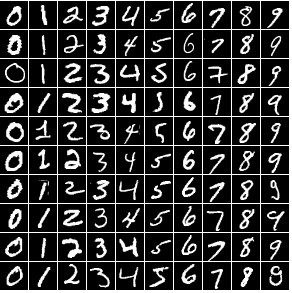
Example set of images of numbers - neural network reads the image and identifies the number.
Complete Code
// Image to Number

// input 28x28 - 784
// hidden
// output 10 (0-9)

await xinitialize( {layers:[784,100,10], build:'cpu', learningrate:0.2} );


let fp = await fetch('https://webgpulab.xbdev.net/var/resources/mnist.js');
let ft = await fp.text();
var script = document.createElement('script');
script.innerHTML = ft;
document.head.appendChild(script);


let img = document.createElement('img');
img.id = 'sample';
document.body.appendChild( img );
img.src = 'https://webgpulab.xbdev.net/var/images/mnist.png';

/*
display the console.log output to the window
*/
let divLog = document.createElement('div');
document.body.appendChild( divLog );
divLog.id = 'debug';
divLog.style.left     = "0px";
divLog.style.top      = "0px";
divLog.style.width    = "500";
divLog.style.height   = "500";
divLog.style['box-sizing'] = 'border-box';
divLog.style['padding'] = "10px";
divLog.style["pointer-events"] = "none";

console.oldlog = console.log;
console.log = function(txt){
    console.oldlog( txt );
    // extract code to get the line number the log was called from
    var err = new Error();
    var line = err.stack.split("\n")[2];
    var index = line.indexOf("at ");
    var clean = line.slice(index+2, line.length);
    clean = clean.split('/');
    clean = clean[ clean.length-1 ];

    // write the text to the debug div window
    divLog.innerHTML += 'debug: ['+clean+'] ' + txt + '<br>';
}


console.log('starting program');
console.log('loading image data');


let outlookup = [
 //0 1 2 3 4 5 6 7 8 9
 [1,0,0,0,0,0,0,0,0,0],
 [0,1,0,0,0,0,0,0,0,0],
 [0,0,1,0,0,0,0,0,0,0],
 [0,0,0,1,0,0,0,0,0,0],
 [0,0,0,0,1,0,0,0,0,0],
 [0,0,0,0,0,1,0,0,0,0],
 [0,0,0,0,0,0,1,0,0,0],
 [0,0,0,0,0,0,0,1,0,0],
 [0,0,0,0,0,0,0,0,1,0],
 [0,0,0,0,0,0,0,0,0,1]
];

let imgData = [];

img.onload = async function(){
    console.log('image loaded');

    let imgCanvas    = document.createElement("canvas"),
    //let imgCanvas    = document.getElementById('my-canvas');
    imgContext       = imgCanvas.getContext("2d");
    imgCanvas.width  = img.width;
    imgCanvas.height = img.height;

    console.log('width:' + img.width);

    imgContext.drawImage(img, 0, 0, img.width, img.height);

    data = []

    let numx = (img.width + 1)  / 29;
    let numy = (img.height + 1) / 29;

    for (let xx=0; xx<numx; xx++)
    {
        for(let yy=0; yy<numy; yy++)
        {
            let imgData = imgContext.getImageData(xx*29, yy*29, 28, 28).data;
            graydata = []
            for (let kk=0; kk<imgData.length; kk+=4)
            {
                graydata.push( imgData[kk] );
            }
            data.push( { number:xx, datain:graydata, dataout:outlookup[xx] } );
        }
    }

    //console.log( data );


var trainingData = [];
for(var bb = 0; bb < data.length; bb++) {
    trainingData.push({
        input:  data[bb].datain,
        output: data[bb].dataout
    });
}

console.log( 'in[0]:'  + data[0].datain );
console.log( 'out[0]:' + data[0].dataout );


async function iterate(){

    for (let k=0; k<5000; k++)
    {
          let i = Math.floor( Math.random() * data.length );
        await xactivate( data[i].datain );
        await xpropagate( data[i].dataout );

        if ( k%1000==0 ) console.log('training iteration:' + k );
    }
}
await iterate();

// Or if we want to keep updating and checking?
//setInterval( iterate, 1000 );


console.log('testing trained network');
var result = await xactivate( data[0].datain );
console.log('number is: ' + data[0].number  + ',\n result:');
for (let i=0; i<result.length; i++) console.log( i + ':  ' + result[i].toFixed(3) );

}// on image load
Things to Try
• Try increasing or decreasing the training dataset and see how that impacts the accuracy of the prediction.
• Do some manipulation to the training dataset (e.g., rotated, blurred, shifted)
• Write a small test page - that lets a user 'write' a number onto a canvas using mouse - which is scaled down and passed to the neural network for analysis
• Generating more samples using a handwritten font (e.g., use JavaScript and HTML canvas)
• Try going the other way - 'number-to-image' pass in a number and it generates an image
• Extend the previous point by including extra input arguments (e.g., style, thickness, ...)
• Try predicting other symbols instead of numbers (shapes, letters, ...)
Resources and Links
• WebGPU Lab Demo [LINK]
• Wikipedia MNIST Dataset [LINK]
Visitor:
Copyright (c) 2002-2026 xbdev.net - All rights reserved.
Designated articles, tutorials and software are the property of their respective owners.