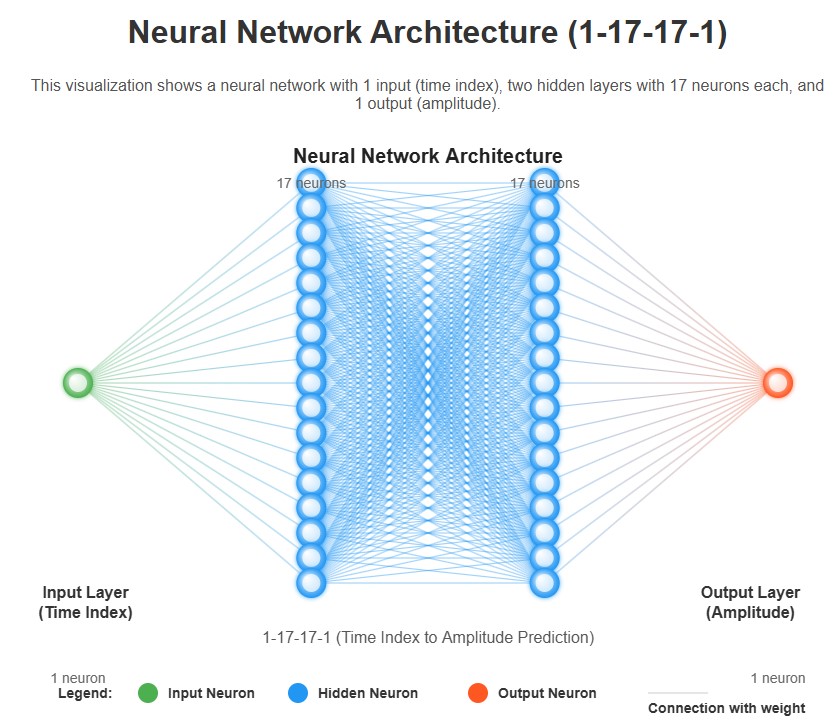
• Neural network (1-17-17-1) - input (1) time index and output (1) amplitude
Visual illustration of the network configuration.
Complete Code
// Learning Sound Deep Neural Network
// (1) time (time index for input)
// (17,17) hidden layers
// (1) amplitude
await xinitialize( {layers:[1,17,17,1], build:'cpu', learningrate:0.1} );

let div = document.createElement('div');
document.body.appendChild( div );
div.innerHTML = `
<br><br>
Load Training Sound (hello.mp3) and Start Training Neural Network
<br><br>
Number of training iterations:<br>
<div id="counter">Iteration:</div>
Error between ideal and trained version:
<div id="error">Error:</div>
<br>
`;
let but = (f, n) =>
{
      let el = document.createElement('button');
    document.body.appendChild( el );
    el.innerHTML = n;
    el.onclick = ()=>{ f(); };
}
but( getData, 'Start' );
but( stopTraining, 'Stop' );
but( playOriginalSound, 'Play Original Sound' );
but( playTrainedSound, 'Play Trained Sound' );


let audioCtx        = null;
let sndData         = null;
let sndTrainedData  = null;
let iteration       = 0;
let training        = true;

function stopTraining() {
   training = false;
}

async function getData() {
  if(window.webkitAudioContext) {
    audioCtx = new window.webkitAudioContext();
  } else {
    audioCtx = new window.AudioContext();
  }

  training = true;
  source = audioCtx.createBufferSource();
  request = new XMLHttpRequest();

  request.open('GET', 'https://webgpulab.xbdev.net/var/resources/hello.mp3', true);

  request.responseType = 'arraybuffer';

  request.onload = async function() {
    let audioData = request.response;

    audioCtx.decodeAudioData(audioData, async function(buffer) {
        sndData = buffer;

        console.log('num channels: ' + buffer.numberOfChannels );

        let data = sndData.getChannelData(0); // get data
        console.log('length of data/samples: ' + data.length );

        // create neural network sound buffer
        const bufferSize = data.length;
        sndTrainedData = audioCtx.createBuffer(1, bufferSize, audioCtx.sampleRate);

        // start training the neural network
        await iterate();
      },

      function(e){"Error with decoding audio data" + e.error});
  }
  request.send();
}


function playSoundData( sdata ) {
    var source = audioCtx.createBufferSource();

    // set the buffer in the AudioBufferSourceNode
    source.buffer = sdata;

    // connect the AudioBufferSourceNode to the
    // destination so you can hear the sound
    source.connect(audioCtx.destination);

    // start the source playing
    source.start();
}

function getAmplitude( dataBuffer, t ){
    let dataArray = dataBuffer.getChannelData(0); // get data

    return dataArray[ t ];
}


function playOriginalSound() {
    playSoundData( sndData );
}


async function playTrainedSound(){ // preview

    let noSamples  = sndTrainedData.getChannelData(0).length;
    let bdata      = sndTrainedData.getChannelData(0);

    for (let tt = 0; tt < noSamples; tt+=1)
    {
        let amp = await xactivate( [ tt/noSamples ] );
        let val = amp[0] * 2.0 - 1.0;
        console.assert( val >=-1 && val <= 1);
        bdata[tt] = val;
    }

    playSoundData( sndTrainedData );
}


// iteration starts once the data has been loaded
async function iterate(){
    if ( !training ) return;

    iteration++;
    let noSamples = sndData.getChannelData(0).length;

    console.log('noSamples:', noSamples );

    let totalError = 0;
    for (let tt = 0; tt < noSamples; tt+=1)
    {
        let dynamicRate =  1.0/(100.0 + 1*iteration);
        let amp = getAmplitude(sndData,tt);//-1 to 1
        let ampNormalized = (amp + 1.0)*0.5; // 0 to 1
        let val = await xactivate( [ tt/noSamples ] );
        console.assert( val >= 0 );
        console.assert( val <= 1 );
        await xpropagate( [amp], dynamicRate );
        totalError = totalError + Math.abs( val[0] - amp );
    }


    let elem1 = document.getElementById('counter');
    elem1.innerHTML = "Iteration: " + iteration;

    let elem2 = document.getElementById('error');
    elem2.innerHTML = "Error: " + totalError;

    requestAnimationFrame(iterate);
}
Things to Try
• Try other test sounds (keep them small) - saying other words
• Try sounds with more complex audio (e.g., other languages with tones, like Chinese)
• Provide to sounds of the same length to the neural network and an extra number; which can be varied between 0 to 1 once the network has been trained
• Try filtering the sound signal; give a sound input with an echo and an output sound without an echo