www.xbdev.net
xbdev - software development
Friday September 11, 2026
Home | Contact | Support | WebGPU Graphics and Compute ... | Neural Networks and WebGPU Compute.. Learning from Data.....


Neural Networks and WebGPU Compute..

Learning from Data.....


Sine Wave


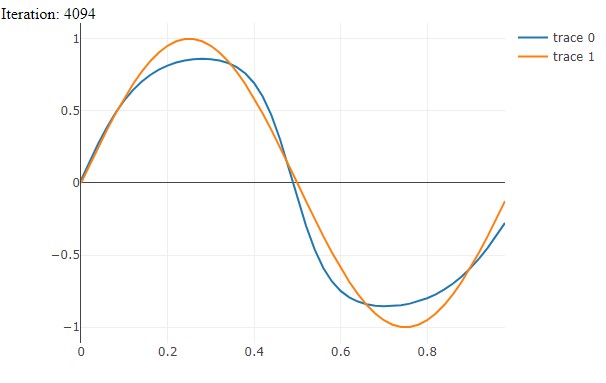
Having a neural network learn the sine wave function - pass in a single floating point value and it outputs the amplitude of the sinewave signal. Essentially, emulating the
sin(..)
function.


Training neural network to emulate a sine wave signal.


Complete Code


<?php
let fp = await fetch('https://cdn.plot.ly/plotly-2.1.0.min.js');
let ft = await fp.text();
var script = document.createElement('script');
//script.src = 'https://cdn.plot.ly/plotly-2.1.0.min.js';
script.innerHTML = ft;
document.head.appendChild(script); 

  
await xinitialize( {layers:[1,17,17,1], build:'cpu', learningrate:0.2} );

// sine wave signal - deep neural network
// (1) time (time index for input)
// (17,17) hidden layers 
// (1) amplitude


// SINE WAVE


let noSamples       = 50;
let iteration       = 0;
var trainingSet;// = [];


// Function to shuffle data
function shuffle(array) {
    for (let i = array.length - 1; i > 0; i--) {
        const j = Math.floor(Math.random() * (i + 1));
        [array[i], array[j]] = [array[j], array[i]];
    }
    return array;
}

// Function to create mini-batches
function createMiniBatches(data, batchSize) {
    let miniBatches = [];
    for (let i = 0; i < data.length; i += batchSize) {
        miniBatches.push(data.slice(i, i + batchSize));
    }
    return miniBatches;
}

async function calcTotalError()
{
  let totalError = 0;
  for (let tt = 0; tt < noSamples; tt+=1)
  {
    // nn value
    let amp = await xactivate( [ tt/noSamples ] );
    let val = amp[0] * 2.0 - 1.0;

    // ideal value
    let t = 2 * Math.PI * tt/noSamples;
    let mval = Math.sin( t );

    totalError = totalError + Math.abs( val - mval );
  }

  let elem2 = document.getElementById('error');
    if ( elem2==undefined ){ elem2 = document.createElement('div');
                             elem2.id = 'error';
                             document.body.appendChild( elem2 ); };
  elem2.innerHTML = "Error: " + totalError;
}

// iteration starts once the data has been loaded
async function iterate(){

  iteration++;

  let elem1 = document.getElementById('counter');
    if ( elem1==undefined ){ elem1 = document.createElement('div');
                             elem1.id = 'counter';
                             document.body.appendChild( elem1 ); };
  elem1.innerHTML = "Iteration: " + iteration;


  if ( (iteration%10) === 0 ) // only update graph every 5 iterations
  {
    await plotData();
  }

  //calcTotalError();

  if (trainingSet == undefined )
  {
        console.log('creating dataset');
    trainingSet = [];

    for (let tt = 0; tt < noSamples; tt+=1)
    {
      let t = 2 * Math.PI * tt/noSamples;

      //console.assert(t>=0 && t<=1 );
      let amp = Math.sin( t );  //-1 to 1

      let ampNormalized = (amp + 1.0)*0.5; // 0 to 1
      console.assert( ampNormalized >= 0 );
      console.assert( ampNormalized <= 1 );

      trainingSet.push( {inputs: [tt/noSamples],
                         outputs:[ampNormalized] } );

    }
  }

  const NUM_EPOCHS = 5;
  const BATCH_SIZE = 20;
  
  for (let epoch = 0; epoch < NUM_EPOCHS; epoch++) 
  {
      let shuffledData = shuffle(trainingSet);
    let miniBatches = createMiniBatches(shuffledData, BATCH_SIZE);

      for (let miniBatch=0; miniBatch<miniBatches.length; miniBatch++)
      {
        let batches = miniBatches[ miniBatch ];
          for (let bat=0; bat<batches.length; bat++)
          {
              let datum = batches[ bat ];
              await xactivate( datum.inputs );
              await xpropagate( datum.outputs );
          };
      };
  }
  requestAnimationFrame( iterate);
}

requestAnimationFrame( iterate );

async function plotData()
{
    // plot trained data
    {
  let x = [];
  let y = [];
  let y2 = [];
  for (let tt = 0; tt < noSamples; tt+=1)
  {
    let t = 2 * Math.PI * tt/noSamples;
    let amp = await xactivate( [ tt/noSamples ] );

    let val = amp[0] * 2.0 - 1.0;
    x.push( tt/noSamples  );
    y.push( val )
    y2.push( Math.sin( t ) );
  }
  let plot1 = document.getElementById('plot1');
    if ( plot1==undefined ){ plot1 = document.createElement('div');
                             plot1.id = 'plot1';
               plot1.style.width  = '600px';
                             plot1.style.height = '400px';
                             document.body.appendChild( plot1 ); };
    

  Plotly.newPlot( plot1, [{ x, y}], { 
                margin: { t: 0 } }, {showSendToCloud:true} );

  // plot ideal data
  Plotly.addTraces( plot1, {x, y: y2} );
  }
}// end plotData(..)


WebGPU by Example: Fractals, Image Effects, Ray-Tracing, Procedural Geometry, 2D/3D, Particles, Simulations WebGPU Compute graphics and animations using the webgpu api 12 week course kenwright learn webgpu api kenwright programming compute and graphics applications with html5 and webgpu api kenwright real-time 3d graphics with webgpu kenwright webgpu api develompent a quick start guide kenwright webgpu by example 2022 kenwright webgpu gems kenwright webgpu interactive compute and graphics visualization cookbook kenwright wgsl webgpu shading language cookbook kenwright wgsl webgpugems shading language cookbook kenwright


Advert (Support Website)

 
 Visitor:
Copyright (c) 2002-2026 xbdev.net - All rights reserved.
Designated articles, tutorials and software are the property of their respective owners.