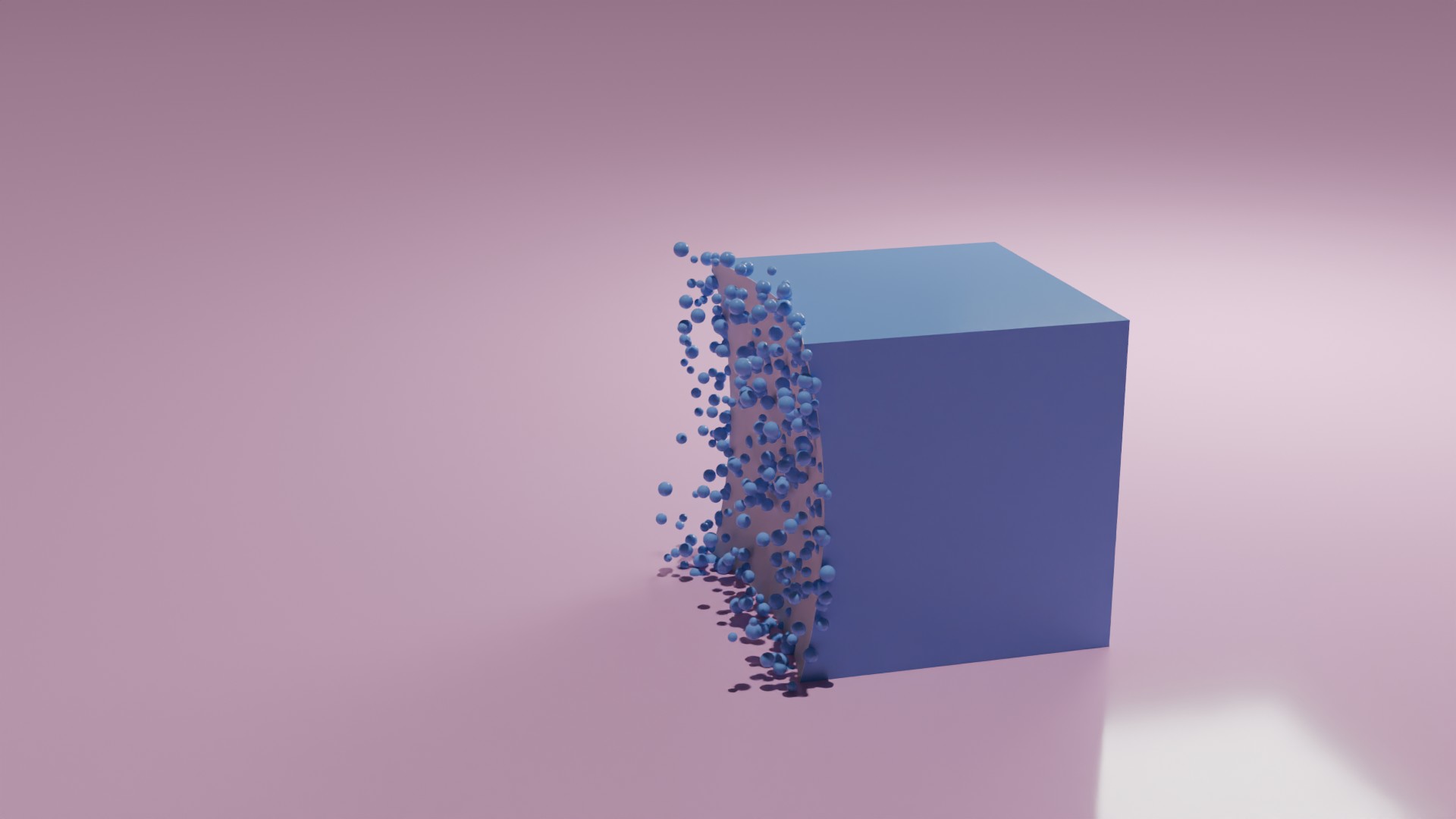
We'll have a shape gradually dissolve into a dust cloud of particles - we'll mix the boolean operation and the particle emmitter system. The effect is dynamic - so if you play the animation - you'll see the effect in all its glory. Start of with a solid cube - which gradually dissolves from one side.
Snapshot of one of the frames as the shape is changing into particles.
The key process for what's happening is a bit tricky, as you have to make sure you 'apply modifiers' to the particle emitter - without this flag the particles don't seem to follow the surface.
Also when constructing the 'surface' - it's a two phase setup - the first boolean 'cuts' the shape - so we're left with the remaining cube. But to get only the 'surface' which we'll use as the particle emmitter surface - we need to clone the cube and add another modifer - this time we are only interested with the overlapping (or intersecting) geometry.
To avoid any 'z-fighting' or 'plane-fight' - we make the new cube a bit thicker (bigger) - by using the 'solidify' modifier.
For the implementation below - we just have the particle appear then die after a small amount of time - but you can also mix in vortex and wind effects to give it a more dramatic and powerful feeling.
<?php
import bpy

# 1. Clear the scene
bpy.ops.object.select_all(action='SELECT')
bpy.ops.object.delete()
for obj in bpy.data.objects:
    bpy.data.objects.remove(obj)

# Add a cube
bpy.ops.mesh.primitive_cube_add(size=2, location=(0, 0, 1))
cube = bpy.context.object
cube.name = "TargetCube"

# Add a sphere
# bpy.ops.mesh.primitive_uv_sphere_add(radius=4, location=(-0, 0, 0))
bpy.ops.mesh.primitive_ico_sphere_add(radius=4, location=(0, 0, 0), subdivisions=6)

sphere = bpy.context.object
sphere.name = "CutterSphere"

# Make sphere invisible in renders and viewport
sphere.hide_render = True
sphere.hide_viewport = True

# Animate sphere moving across the cube
sphere.location = (-5, 0, 1)
sphere.keyframe_insert(data_path="location", frame=1)
sphere.location = (3, 0, 1)
sphere.keyframe_insert(data_path="location", frame=200)

# Add Boolean Difference modifier to the cube (original cut)
boolean_diff = cube.modifiers.new(name="BooleanDifference", type='BOOLEAN')
boolean_diff.operation = 'DIFFERENCE'
boolean_diff.solver = 'EXACT'
boolean_diff.object = sphere  # Assign sphere reference AFTER creating modifier

# Duplicate the cube
cube_intersect = cube.copy()
cube_intersect.data = cube.data.copy()
bpy.context.collection.objects.link(cube_intersect)
cube_intersect.name = "IntersectedSurface"

# Add Solidify Modifier to the duplicated cube
solidify = cube_intersect.modifiers.new(name="Solidify", type='SOLIDIFY')
solidify.thickness = 0.01  # Adjust thickness as needed
solidify.offset = 0.01

# Add an Intersection Boolean modifier
intersect_mod = cube_intersect.modifiers.new(name="Intersect", type='BOOLEAN')
intersect_mod.operation = 'INTERSECT'
intersect_mod.object = sphere
intersect_mod.solver = 'EXACT'

# Make sure object is visible and selectable
bpy.context.view_layer.objects.active = cube_intersect

bpy.ops.object.mode_set(mode='OBJECT')

# Set up particle system - ensure object is selectable and active
bpy.context.view_layer.objects.active = cube_intersect
cube_intersect.select_set(True)
bpy.ops.object.particle_system_add()

psys = cube_intersect.particle_systems[0]
psettings = psys.settings


# Particle settings
psettings.count = 9500
psettings.frame_start = 1
psettings.frame_end = 200
psettings.lifetime = 10
psettings.lifetime_random = 0.5
psettings.emit_from = 'VERT'
psettings.normal_factor = 0.5
psettings.factor_random = 0.5
psettings.physics_type = 'NEWTON'
psettings.mass = 0.1
psettings.brownian_factor = 0.2
psettings.use_emit_random = True
psettings.particle_size = 0.05
psettings.size_random = 0.5
psettings.use_modifier_stack = True
psettings.effector_weights.gravity = 0.0
bpy.context.scene.use_gravity = False


# Create particle object if it doesn't exist
if "ParticleSphere" not in bpy.data.objects:
    bpy.ops.mesh.primitive_uv_sphere_add(radius=1.0, location=(0, 100, 0))
    particle_obj = bpy.context.object
    particle_obj.name = "ParticleSphere"
    particle_obj.hide_render = False
    particle_obj.hide_viewport = False

particle_obj = bpy.data.objects["ParticleSphere"]

psettings.render_type = 'OBJECT'
psettings.instance_object = particle_obj
psettings.use_rotation_instance = True

# Add a ground plane at the origin
bpy.ops.mesh.primitive_plane_add(size=200, location=(0, 0, 0))
ground = bpy.context.object
ground.name = "GroundPlane"

# Do not draw the boolean intersectino frame
cube_intersect.show_instancer_for_render = False
cube_intersect.show_instancer_for_viewport = False

# Create pink material for the ground
pink_mat = bpy.data.materials.new(name="PinkMaterial")
pink_mat.use_nodes = True
nodes = pink_mat.node_tree.nodes
nodes.clear()

bsdf = nodes.new('ShaderNodeBsdfPrincipled')
bsdf.inputs['Base Color'].default_value = (0.9, 0.4, 0.7, 1.0)  # Pink
bsdf.inputs['Roughness'].default_value = 0.1

output = nodes.new('ShaderNodeOutputMaterial')
pink_mat.node_tree.links.new(bsdf.outputs['BSDF'], output.inputs['Surface'])

# Assign pink material to ground
ground.data.materials.clear()
ground.data.materials.append(pink_mat)

# Create blue material for cube and particles
blue_mat = bpy.data.materials.new(name="BlueMaterial")
blue_mat.use_nodes = True
nodes = blue_mat.node_tree.nodes
nodes.clear()

bsdf = nodes.new('ShaderNodeBsdfPrincipled')
bsdf.inputs['Base Color'].default_value = (0.2, 0.4, 0.9, 1.0)  # Blue
bsdf.inputs['Roughness'].default_value = 0.1

output = nodes.new('ShaderNodeOutputMaterial')
blue_mat.node_tree.links.new(bsdf.outputs['BSDF'], output.inputs['Surface'])

# Assign blue material to cube and particle object
cube.data.materials.clear()
cube.data.materials.append(blue_mat)

particle_obj.data.materials.clear()
particle_obj.data.materials.append(blue_mat)


import mathutils

# Add camera
bpy.ops.object.camera_add(location=(-4, -11, 5))
camera = bpy.context.object
bpy.context.scene.camera = camera

# Compute direction to origin and convert to Euler rotation
direction = mathutils.Vector((0, 4, 0)) - camera.location
rotation = direction.to_track_quat('-Z', 'Y').to_euler()

# Apply rotation
camera.rotation_euler = rotation


# Add lighting
bpy.ops.object.light_add(type='SUN', location=(5, 5, 90))
sun = bpy.context.object
sun.data.energy = 2

bpy.ops.object.light_add(type='AREA', location=(5, 5, 5))
area = bpy.context.object
area.data.energy = 1000
area.data.size = 4
area.data.shape = 'SQUARE'

# Jump to frame 19 to see the effect
bpy.context.scene.frame_set(0)
bpy.context.scene.frame_set(10)
• Try it with other shapes (instead of just a cube)
• Try animating the particles (so they change shape and spin)
• Instead of a 'sphere' for the boolean - mix it with cloud noise or another shape
• Add in other forces for the turbulance (wind, vortex, ...)
Visitor:
Copyright (c) 2002-2026 xbdev.net - All rights reserved.
Designated articles, tutorials and software are the property of their respective owners.