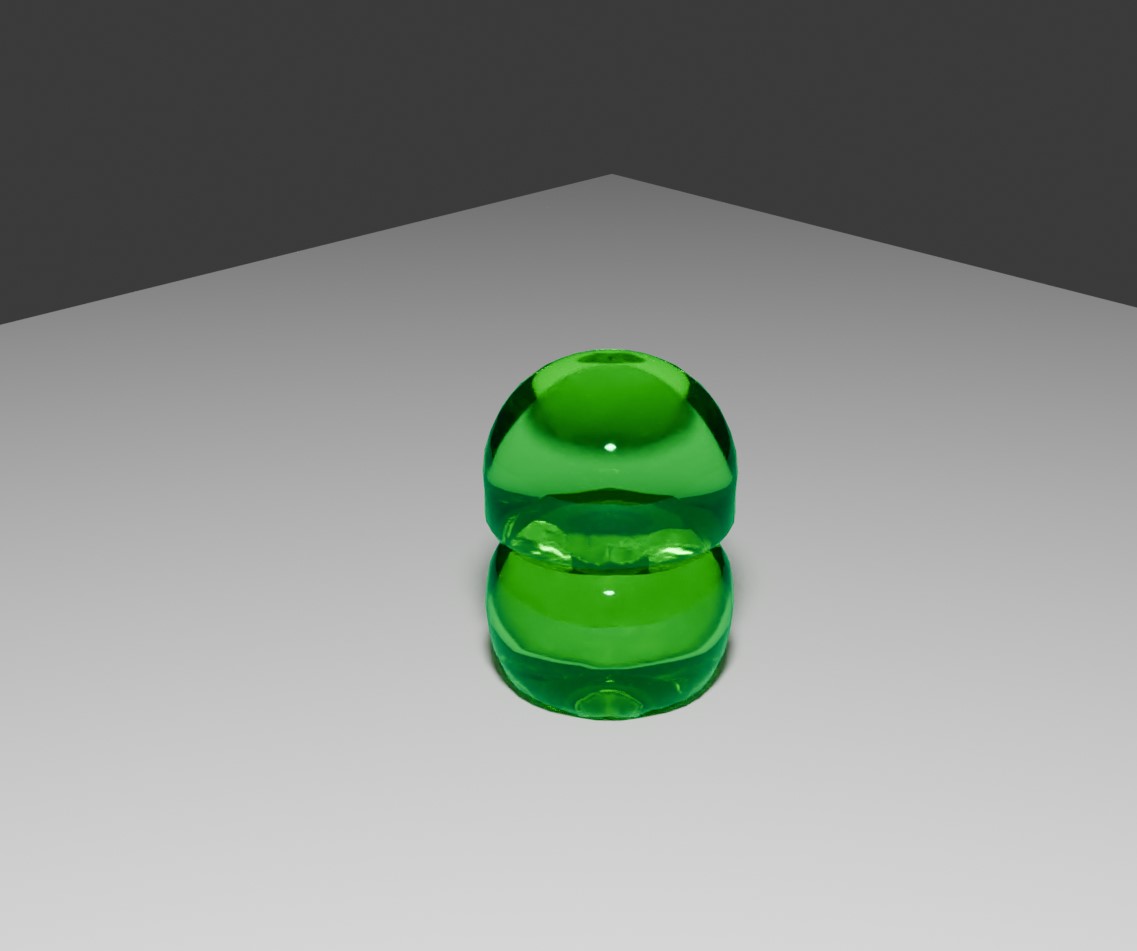
As well as rigid bodies, particles and other physics-based systems - Blender also supports 'soft bodies' - so you can create squish jelly like creations. What is more, they can interact with one another - bouncing off and around your scene.
A couple of jelly cubes falling on to a plane (and on top of one another).
The complete implementation is generated using a single script.
The code looks longer than it should - more than half the code is for clearing the scene and creating some nice looking materials (glassy jellow for the soft bodies and a simple floor).
<?php
import bpy
from mathutils import Vector

# 🧹 Deselect and delete all objects
bpy.ops.object.select_all(action='DESELECT')
for obj in bpy.context.scene.objects:
    obj.select_set(True)
bpy.ops.object.delete()

# 🧼 Clear materials
for mat in bpy.data.materials:
    bpy.data.materials.remove(mat, do_unlink=True)

# 🔥 Clear meshes
for mesh in bpy.data.meshes:
    bpy.data.meshes.remove(mesh, do_unlink=True)

# 🖼️ Clear images
for image in bpy.data.images:
    if image.users == 0:
        bpy.data.images.remove(image)

# 🎨 Clear textures
for tex in bpy.data.textures:
    bpy.data.textures.remove(tex)

# 🔗 Optional: clean up unused node groups
for ng in bpy.data.node_groups:
    if ng.users == 0:
        bpy.data.node_groups.remove(ng)

# 💥 Bonus: remove cameras and lights too
for cam in bpy.data.cameras:
    bpy.data.cameras.remove(cam)
for lamp in bpy.data.lights:
    bpy.data.lights.remove(lamp)

# Create floor
bpy.ops.mesh.primitive_plane_add(size=10, location=(0, 0, 0))
floor = bpy.context.active_object
floor.name = "Floor"
floor.location.z = 0

def create_glass_material(name="GlassMaterial"):
    # Check if it already exists
    if name in bpy.data.materials:
        return bpy.data.materials[name]

    # Create new material
    mat = bpy.data.materials.new(name=name)
    mat.use_nodes = True

    # Clear default nodes
    nodes = mat.node_tree.nodes
    nodes.clear()

    # Add Glass BSDF
    output = nodes.new(type='ShaderNodeOutputMaterial')
    glass = nodes.new(type='ShaderNodeBsdfGlass')
    glass.inputs["IOR"].default_value = 1.45
    glass.inputs["Roughness"].default_value = 0.05

    # 🎨 Set color to blue (RGB)
    glass.inputs["Color"].default_value = (0.0, 1.0, 0.3, 1.0)  # (R, G, B, Alpha)

    # Link nodes
    mat.node_tree.links.new(glass.outputs["BSDF"], output.inputs["Surface"])

    return mat

# Create or get glass material
glass_mat = create_glass_material()


def create_floor_material(name="FloorMaterial"):
    # Check if it already exists
    if name in bpy.data.materials:
        return bpy.data.materials[name]

    # Create new material
    mat = bpy.data.materials.new(name=name)
    mat.use_nodes = True

    # Clear existing nodes
    nodes = mat.node_tree.nodes
    nodes.clear()

    # Add nodes
    output = nodes.new(type='ShaderNodeOutputMaterial')
    diffuse = nodes.new(type='ShaderNodeBsdfDiffuse')

    # Set color to light gray (RGB)
    diffuse.inputs["Color"].default_value = (0.8, 0.8, 0.8, 1.0)

    # Link nodes
    mat.node_tree.links.new(diffuse.outputs["BSDF"], output.inputs["Surface"])

    return mat

floor_mat = create_floor_material();

def addSoftCube( yy ):
    # Create cube
    bpy.ops.mesh.primitive_cube_add(size=1, location=(0, 0, yy))
    cube = bpy.context.active_object
    cube.name = "JellyCube"
    if cube.data.materials:
        cube.data.materials[0] = glass_mat
    else:
        cube.data.materials.append(glass_mat)


    # Apply subdivision for smoother deformation
    bpy.ops.object.modifier_add(type='SUBSURF')
    cube.modifiers["Subdivision"].levels = 3
    cube.modifiers["Subdivision"].render_levels = 3
    bpy.ops.object.modifier_apply(modifier="Subdivision")

    bpy.context.view_layer.objects.active = cube
    bpy.ops.object.shade_smooth()

    # Add soft body physics to the cube
    cube.select_set(True)
    bpy.context.view_layer.objects.active = cube
    bpy.ops.object.modifier_add(type='SOFT_BODY')
    sb = cube.modifiers["Softbody"]

    # Configure soft body settings
    cube.soft_body.use_goal = False
    cube.soft_body.use_edges = True
    cube.soft_body.use_self_collision = False
    sb.settings.shear = 1
    sb.settings.bend = 0.9
    sb.settings.use_stiff_quads = True

    sb.settings.pull = 0.9     # Resistance to stretching
    sb.settings.push = 0.9     # Resistance to compression
    sb.settings.damping = 0.5  # General motion damping

    # Add collision modifier so cubes collide with each other
    bpy.ops.object.modifier_add(type='COLLISION')


addSoftCube(3)
addSoftCube(2)

# Make the floor a collision object
bpy.context.view_layer.objects.active = floor
bpy.ops.object.modifier_add(type='COLLISION')
floor.data.materials.append( floor_mat )

# Set gravity
bpy.context.scene.gravity = (0, 0, -9.81)

# Set timeline
bpy.context.scene.frame_start = 1
bpy.context.scene.frame_end = 100

# Set cube origin for better squish behavior
bpy.ops.object.origin_set(type='ORIGIN_CENTER_OF_MASS', center='BOUNDS')


# === ADD LIGHT ===
bpy.ops.object.light_add(type='AREA', location=(4, -4, 6))
light = bpy.context.active_object
light.data.energy = 1500

# === ADD CAMERA ===
bpy.ops.object.camera_add(location=(6, -6, 4), rotation=(1.2, 0, 0.8))
bpy.context.scene.camera = bpy.context.active_object
Stairs
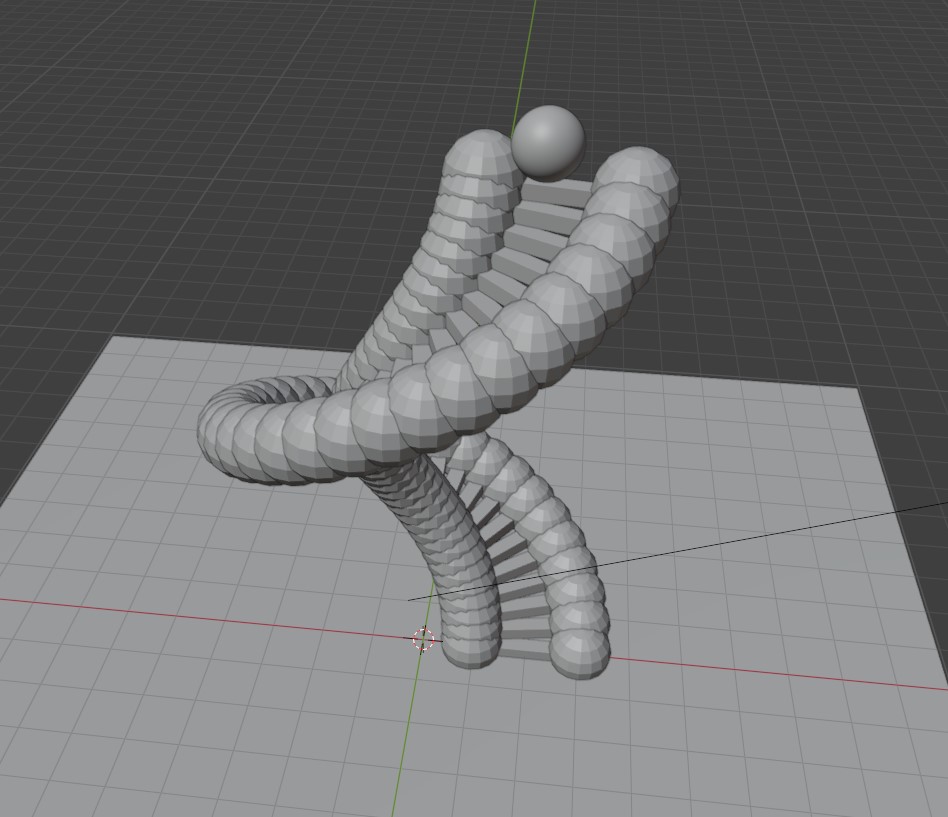
To make things more interesting - we can create a spiral staircase and put a jelly-ball at the top - of course, to make sure the ball doesn't just roll off the edge - we'll put spheres on each side. These jsut push the sphere inwards - we don't show them in the final render.
See the layout for the staircase - the spheres on the edge of the staircase are to keep the soft body on the staircase (do not draw them in the final render).
<?php
import bpy
from math import pi, sin, cos
from mathutils import Vector

# 🧹 Clear the scene
bpy.ops.object.select_all(action='DESELECT')
for obj in bpy.context.scene.objects:
    obj.select_set(True)
bpy.ops.object.delete()

# 🧼 Clear unused data
for block in [bpy.data.materials, bpy.data.meshes, bpy.data.textures, bpy.data.images]:
    for item in block:
        block.remove(item)

def create_glass_material(name="GlassMaterial"):
    # Check if it already exists
    if name in bpy.data.materials:
        return bpy.data.materials[name]

    # Create new material
    mat = bpy.data.materials.new(name=name)
    mat.use_nodes = True

    # Clear default nodes
    nodes = mat.node_tree.nodes
    nodes.clear()

    # Add Glass BSDF
    output = nodes.new(type='ShaderNodeOutputMaterial')
    glass = nodes.new(type='ShaderNodeBsdfGlass')
    glass.inputs["IOR"].default_value = 1.45
    glass.inputs["Roughness"].default_value = 0.05

    # 🎨 Set color to blue (RGB)
    glass.inputs["Color"].default_value = (0.0, 1.0, 0.3, 1.0)  # (R, G, B, Alpha)

    # Link nodes
    mat.node_tree.links.new(glass.outputs["BSDF"], output.inputs["Surface"])

    return mat


# Create materials
def create_material(name, color, roughness=0.0, metallic=0.0):
    mat = bpy.data.materials.new(name=name)
    mat.use_nodes = True
    nodes = mat.node_tree.nodes
    nodes.clear()

    output = nodes.new(type='ShaderNodeOutputMaterial')
    principled = nodes.new(type='ShaderNodeBsdfPrincipled')
    principled.inputs["Base Color"].default_value = color
    principled.inputs["Roughness"].default_value = roughness
    principled.inputs["Metallic"].default_value = metallic

    mat.node_tree.links.new(principled.outputs["BSDF"], output.inputs["Surface"])
    return mat

# Create materials
stair_mat = create_material("StairMaterial", (0.8, 0.7, 0.6, 1), 0.4, 0.2)
# sphere_mat = create_material("SphereMaterial", (0.1, 0.8, 0.6, 1), 0.2)
floor_mat = create_material("FloorMaterial", (0.9, 0.9, 0.9, 1), 0.6)

# Create or get glass material
sphere_mat = create_glass_material()


def create_circular_staircase(steps=20, radius=2, step_height=0.3, step_width=1.5):
    angle_step = 2 * pi / steps
    inner_radius = radius - 1.05  # Inner barrier radius
    outer_radius = radius + 1.05  # Outer barrier radius

    # Create invisible spherical barriers
    for i in range(steps):
        angle = i * angle_step
        z = i * step_height + step_height/2  # Center of step height

        # Inner barrier sphere
        x_inner = inner_radius * cos(angle)
        y_inner = inner_radius * sin(angle)

        bpy.ops.mesh.primitive_uv_sphere_add(
            radius=0.6,  # Sphere size
            location=(x_inner, y_inner, z),
            segments=16,
            ring_count=8
        )
        inner_barrier = bpy.context.active_object
        inner_barrier.name = f"InnerBarrier_{i}"
        bpy.ops.object.modifier_add(type='COLLISION')
        inner_barrier.hide_render = True
        inner_barrier.collision.cloth_friction = 0.0
        inner_barrier.collision.damping = 0.5  # Softer collisions
        inner_barrier.hide_render = True

        # Outer barrier sphere
        x_outer = outer_radius * cos(angle)
        y_outer = outer_radius * sin(angle)

        bpy.ops.mesh.primitive_uv_sphere_add(
            radius=0.6,
            location=(x_outer, y_outer, z),
            segments=16,
            ring_count=8
        )
        outer_barrier = bpy.context.active_object
        outer_barrier.name = f"OuterBarrier_{i}"
        bpy.ops.object.modifier_add(type='COLLISION')
        outer_barrier.hide_render = True
        outer_barrier.collision.cloth_friction = 0.0
        outer_barrier.collision.damping = 0.5
        outer_barrier.hide_render = True

    # Create visible cube steps
    for i in range(steps):
        angle = i * angle_step
        x = radius * cos(angle)
        y = radius * sin(angle)
        z = i * step_height

        # Create step (still as cube)
        bpy.ops.mesh.primitive_cube_add(size=1, location=(x, y, z))
        step = bpy.context.active_object
        step.name = f"Step_{i}"
        step.dimensions = (step_width, 0.3, step_height)
        step.rotation_euler.z = angle

        bpy.ops.object.modifier_add(type='COLLISION')
        step.data.materials.append(stair_mat)

# Create staircase with spherical barriers
create_circular_staircase(steps=40, radius=2, step_height=0.25, step_width=1.9)


# Create soft body sphere
def create_soft_sphere(location=(0, 0, 8)):
    bpy.ops.mesh.primitive_uv_sphere_add(radius=0.5, location=location)
    sphere = bpy.context.active_object
    sphere.name = "SoftSphere"

    # Add subdivision for smoother deformation
    bpy.ops.object.modifier_add(type='SUBSURF')
    sphere.modifiers["Subdivision"].levels = 2
    sphere.modifiers["Subdivision"].render_levels = 2
    bpy.ops.object.shade_smooth()

    # Add soft body physics
    bpy.ops.object.modifier_add(type='SOFT_BODY')
    sb = sphere.modifiers["Softbody"]

    # Configure soft body
    sphere.soft_body.mass = 1.0
    sphere.soft_body.use_goal = False
    sb.settings.pull = 0.9
    sb.settings.push = 0.9
    sb.settings.damping = 0.2
    sb.settings.bend = 0.6

    # Add collision
    bpy.ops.object.modifier_add(type='COLLISION')

    # Add material
    sphere.data.materials.append(sphere_mat)

    return sphere

# Create sphere at top of staircase
sphere = create_soft_sphere(location=(1.8, -0.5, 10.5))

# Create floor
bpy.ops.mesh.primitive_plane_add(size=20, location=(0, 0, -0.1))
floor = bpy.context.active_object
floor.name = "Floor"
bpy.ops.object.modifier_add(type='COLLISION')
floor.data.materials.append(floor_mat)

# Set up physics world
bpy.context.scene.gravity = (0, 0, -9.81)
bpy.context.scene.frame_start = 1
bpy.context.scene.frame_end = 300

# Set up lighting
bpy.ops.object.light_add(type='SUN', location=(10, -10, 15))
light = bpy.context.active_object
light.data.energy = 5
light.rotation_euler = (0.8, 0, 0.8)

# Set up camera
bpy.ops.object.camera_add(
    location=(12, -10, 8),  # Pulled further back and higher
    rotation=(1.4, 0, 0.8)  # Same angle but sees more
)
bpy.context.scene.camera = bpy.context.active_object
bpy.context.scene.camera.data.lens = 24

# Set render settings for better visualization
bpy.context.scene.render.engine = 'CYCLES'
bpy.context.scene.cycles.samples = 64
Things to Try
Lots of cool things you can experiement with - once you get your head around how it works!
For example:
• Try creating other soft body shapes (torus, spheres, monkey-head, ..)
• Give them different physical properties (some are stiffer and rigid than others)
• Add a scene with 'lots' of soft bodies (20+)
• Create some 3d text that is also a soft body (so it's squishy and wobbly)
Visitor:
Copyright (c) 2002-2026 xbdev.net - All rights reserved.
Designated articles, tutorials and software are the property of their respective owners.