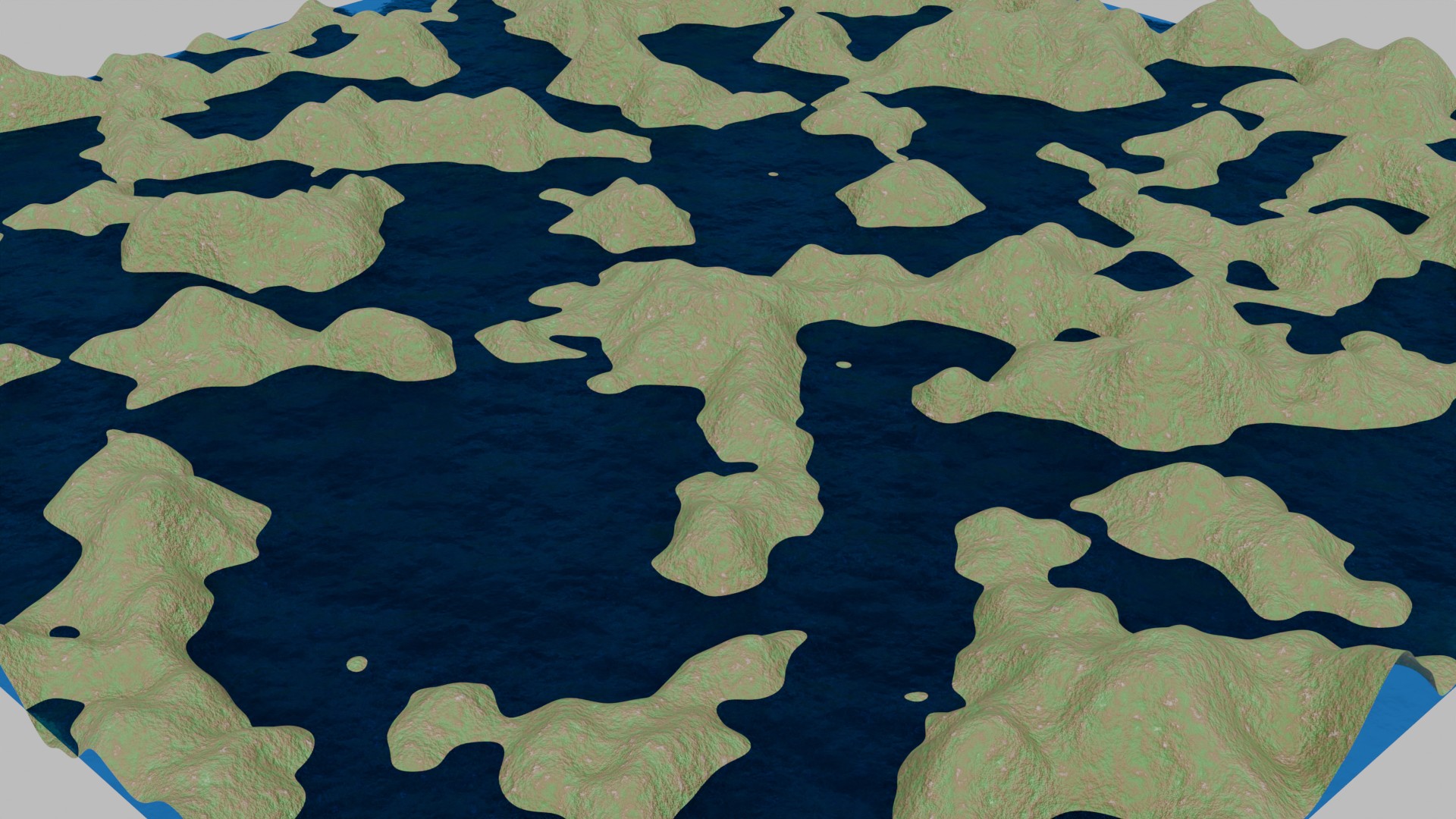
We can create a couple of planes - one for the terrain and the other for a water surface - mix in a bit of cloud noise (snooth noise) - and some height colors (different heights of the terrain have a different color). So the water looks transparent - we can use the BSDF Glass material - with bump mapping - and we have a procedural terrain!
Example of the generated height map in Blender.
<?php
import bpy
import math

# Clear existing objects
bpy.ops.object.select_all(action='SELECT')
bpy.ops.object.delete()

# Create terrain plane
bpy.ops.mesh.primitive_plane_add(size=20)
terrain = bpy.context.active_object
terrain.name = "Terrain"

# Subdivide terrain
bpy.ops.object.mode_set(mode='EDIT')
bpy.ops.mesh.subdivide(number_cuts=200)
bpy.ops.object.mode_set(mode='OBJECT')

# Add displacement modifier with noise
displace = terrain.modifiers.new(name="Displace", type='DISPLACE')
texture = bpy.data.textures.new("TerrainNoise", type='CLOUDS')
texture.noise_scale = 1.5
texture.noise_depth = 6
displace.texture = texture
displace.strength = 3

# Add subdivision for smoother terrain
subsurf = terrain.modifiers.new(name="Subdivision", type='SUBSURF')
subsurf.levels = 2
subsurf.render_levels = 3

# Smooth shading
bpy.ops.object.shade_smooth()

# Create terrain material
terrain_mat = bpy.data.materials.new(name="TerrainMaterial")
terrain.data.materials.append(terrain_mat)
terrain_mat.use_nodes = True
nodes = terrain_mat.node_tree.nodes
links = terrain_mat.node_tree.links

# Clear default nodes
for node in nodes:
    nodes.remove(node)

# Create nodes for terrain material
output = nodes.new(type='ShaderNodeOutputMaterial')
principled = nodes.new(type='ShaderNodeBsdfPrincipled')
tex_coord = nodes.new(type='ShaderNodeTexCoord')
mapping = nodes.new(type='ShaderNodeMapping')
noise = nodes.new(type='ShaderNodeTexNoise')
noise.inputs['Scale'].default_value = 10
noise.inputs['Detail'].default_value = 8
noise.inputs['Roughness'].default_value = 0.7

# Height-based color ramp
color_ramp = nodes.new(type='ShaderNodeValToRGB')
color_ramp.color_ramp.elements[0].position = 0.0
color_ramp.color_ramp.elements[0].color = (0.02, 0.2, 0.05, 1)  # Deep water
color_ramp.color_ramp.elements[1].position = 0.2
color_ramp.color_ramp.elements[1].color = (0.1, 0.4, 0.7, 1)    # Shallow water

# Add more color stops
el = color_ramp.color_ramp.elements.new(0.25)
el.color = (0.9, 0.8, 0.5, 1)  # Sand
el = color_ramp.color_ramp.elements.new(0.35)
el.color = (0.1, 0.4, 0.1, 1)  # Grass
el = color_ramp.color_ramp.elements.new(0.6)
el.color = (0.3, 0.2, 0.1, 1)  # Rock
el = color_ramp.color_ramp.elements.new(0.8)
el.color = (0.8, 0.8, 0.8, 1)  # Snow

# Bump mapping
bump = nodes.new(type='ShaderNodeBump')
bump.inputs['Strength'].default_value = 0.5

# Link terrain material nodes
links.new(tex_coord.outputs['Object'], mapping.inputs['Vector'])
links.new(mapping.outputs['Vector'], noise.inputs['Vector'])
links.new(noise.outputs['Fac'], color_ramp.inputs['Fac'])
links.new(noise.outputs['Fac'], bump.inputs['Height'])
links.new(color_ramp.outputs['Color'], principled.inputs['Base Color'])
links.new(bump.outputs['Normal'], principled.inputs['Normal'])
links.new(principled.outputs['BSDF'], output.inputs['Surface'])

# Create water plane
bpy.ops.mesh.primitive_plane_add(size=20)
water = bpy.context.active_object
water.name = "Water"
water.location.z = 0.0  # Set water level

# Add slight wave displacement to water
displace_water = water.modifiers.new(name="Displace", type='DISPLACE')
texture_water = bpy.data.textures.new("WaterWaves", type='STUCCI')
texture_water.noise_scale = 0.1
displace_water.texture = texture_water
displace_water.strength = 0.05

# Create water material
water_mat = bpy.data.materials.new(name="WaterMaterial")
water.data.materials.append(water_mat)
water_mat.use_nodes = True
nodes = water_mat.node_tree.nodes
links = water_mat.node_tree.links

# Clear default nodes
for node in nodes:
    nodes.remove(node)

# Create nodes for water material
output = nodes.new(type='ShaderNodeOutputMaterial')
glass = nodes.new(type='ShaderNodeBsdfGlass')
glass.inputs['Color'].default_value = (0.02, 0.17, 0.6, 1)  # Blue tint
glass.inputs['Roughness'].default_value = 0.0
glass.inputs['IOR'].default_value = 1.33  # Water's index of refraction

# Add noise for water surface variation
tex_coord = nodes.new(type='ShaderNodeTexCoord')
mapping = nodes.new(type='ShaderNodeMapping')
noise = nodes.new(type='ShaderNodeTexNoise')
noise.inputs['Scale'].default_value = 1
noise.inputs['Detail'].default_value = 10

# Bump for water waves
bump = nodes.new(type='ShaderNodeBump')
bump.inputs['Strength'].default_value = 0.5

# Link water material nodes
links.new(tex_coord.outputs['Object'], mapping.inputs['Vector'])
links.new(mapping.outputs['Vector'], noise.inputs['Vector'])
links.new(noise.outputs['Fac'], bump.inputs['Height'])
links.new(bump.outputs['Normal'], glass.inputs['Normal'])
links.new(glass.outputs['BSDF'], output.inputs['Surface'])

# Setup camera
bpy.ops.object.camera_add()
camera = bpy.context.active_object
camera.location = (15, -15, 10)
camera.rotation_euler = (math.radians(60), 0, math.radians(45))
bpy.context.scene.camera = camera

# Setup lighting
bpy.ops.object.light_add(type='SUN')
sun = bpy.context.active_object
sun.location = (10, -10, 20)
sun.rotation_euler = (math.radians(45), 0, math.radians(45))
sun.data.energy = 3.0

# Setup world environment
world = bpy.context.scene.world
if not world:
    world = bpy.data.worlds.new("World")
    bpy.context.scene.world = world

world.use_nodes = True
nodes = world.node_tree.nodes
links = world.node_tree.links

# Clear default nodes
for node in nodes:
    nodes.remove(node)

# Add simple sky texture
#sky = nodes.new(type='ShaderNodeSkyTexture')
bg = nodes.new(type='ShaderNodeBackground')
output = nodes.new(type='ShaderNodeOutputWorld')

#sky.sky_type = 'HOSEK_WILKIE'
#sky.turbidity = 2.0
#sky.ground_albedo = 0.3

#links.new(sky.outputs['Color'], bg.inputs['Color'])
links.new(bg.outputs['Background'], output.inputs['Surface'])

# Set render settings
bpy.context.scene.render.engine = 'CYCLES'
bpy.context.scene.cycles.samples = 64
bpy.context.scene.render.resolution_x = 1920
bpy.context.scene.render.resolution_y = 1080

# Set viewport shading to rendered
#for area in bpy.context.screen.areas:
#    if area.type == 'VIEW_3D':
#        for space in area.spaces:
#            if space.type == 'VIEW_3D':
#                space.shading.type = 'RENDERED'
Things to Try
The minimal Blender script sets the ground work for more complex terrains (and animations) - for example, try and 'animate' the water, add in a moving sun (moves aross the sky) - put in some waves and ripples (particles), maybe a little boat? Skybox for the sky, clouds in the sky (again particles).
Visitor:
Copyright (c) 2002-2026 xbdev.net - All rights reserved.
Designated articles, tutorials and software are the property of their respective owners.