|
|
 |
Fractals
Natures pattern... |
|
|
|
Fractal patterns, including XOR and plasma, are captivating visual phenomena that emerge from the iterative application of simple mathematical rules. These patterns exhibit self-similarity, meaning that they appear similar at different scales, offering intricate and mesmerizing detail when zoomed in or out. Fractals have found applications in various fields, from art and design to science and engineering, owing to their aesthetic appeal and underlying mathematical elegance.
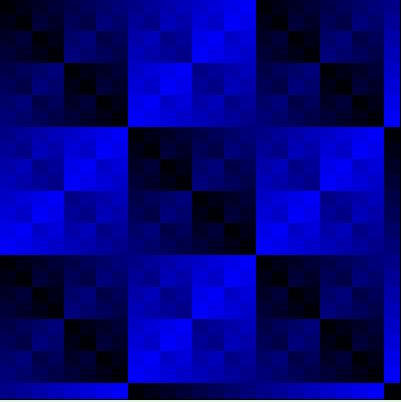
 | XOR Fractal Pattern |  |
<html lang="en">
<head>
<meta charset="UTF-8">
<meta name="viewport" content="width=device-width, initial-scale=1.0">
<title>Fractal XOR Image</title>
<style>
    canvas {
        border: 1px solid black;
    }
</style>
</head>
<body>
<canvas id="fractalCanvas" width="400" height="400"></canvas>

<script>
// Function to generate an XOR pattern
function generateXORPattern(width, height, xx) {
    let xorPattern = [];
    for (let y = 0; y < height; y++) {
        let row = [];
        for (let x = 0; x < width; x++) {
            let cc = ((x + xx) ^ y) & 0xFF;
            let r = (cc >> 16) & 0xFF;
            let g = (cc >> 8) & 0xFF;
            let b = cc & 0xFF;
            row.push(0xff << 24 | r << 16 | g << 8 | b);
        }
        xorPattern.push(row);
    }
    return xorPattern;
}

// Get canvas and its context
let canvas = document.getElementById('fractalCanvas');
let ctx = canvas.getContext('2d');

// Generate XOR pattern
let width = canvas.width;
let height = canvas.height;
let xx = 0;
let xorPattern = generateXORPattern(width, height, xx);

// Draw XOR pattern on canvas
for (let y = 0; y < height; y++) {
    for (let x = 0; x < width; x++) {
        let pixelValue = xorPattern[y][x];
        ctx.fillStyle = 'rgb(' + (pixelValue >> 16 & 0xFF) + ',' + (pixelValue >> 8 & 0xFF) + ',' + (pixelValue & 0xFF) + ')';
        ctx.fillRect(x, y, 1, 1);
    }
}
</script>
</body>
</html>
Example output would look something like:
Things to Try • Different colors (instead of just 2 colors - try and use gradient/more complex patterns)
• Animate the pattern so it scrolls
• Mix in a rotational effect so it has a 'swirl'
• Random - add tiny bit of randomness into the algorithm to make the pattern more unique and interesting
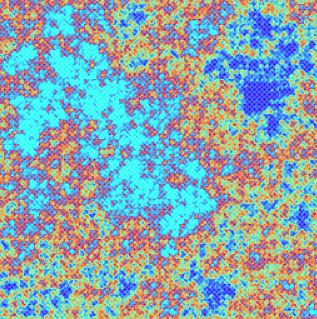
| Plasma Fractal Pattern | |
<html lang="en">
<head>
<meta charset="UTF-8">
<meta name="viewport" content="width=device-width, initial-scale=1.0">
<title>Plasma Image</title>
<style>
    canvas {
        border: 1px solid black;
    }
</style>
</head>
<body>
<canvas id="plasmaCanvas" width="320" height="320"></canvas>

<script>
class Plasma {
    unitRand() {
        return Math.random();
    }

    displace(num, width, height) {
        let max = num / (width + height) * 0.5;
        let r = this.unitRand();
        return (r - 0.5) * max;
    }

    computeColor(c) {
        let red, green, blue;

        if (c < 0.5) {
            red = c * 2;
        } else {
            red = (1 - c) * 2;
        }

        if (c >= 0.3 && c < 0.8) {
            green = (c - 0.3) * 2;
        } else if (c < 0.3) {
            green = (0.3 - c) * 2;
        } else {
            green = (1.3 - c) * 2;
        }

        if (c >= 0.5) {
            blue = (c - 0.5) * 2;
        } else {
            blue = (0.5 - c) * 2;
        }

        // Convert to RGB values between 0 and 255
        let r = Math.round(red * 255);
        let g = Math.round(green * 255);
        let b = Math.round(blue * 255);

        return `rgb(${r}, ${g}, ${b})`;
    }

    divideGrid(ctx, x, y, width, height, c1, c2, c3, c4) {
        let newWidth = width / 2;
        let newHeight = height / 2;

        if (width > 2 || height > 2) {
            let middle = (c1 + c2 + c3 + c4) / 4 + this.displace(newWidth + newHeight, width, height);

            let edge1 = (c1 + c2) / 2;
            let edge2 = (c2 + c3) / 2;
            let edge3 = (c3 + c4) / 2;
            let edge4 = (c4 + c1) / 2;

            this.divideGrid(ctx, x, y, newWidth, newHeight, c1, edge1, middle, edge4);
            this.divideGrid(ctx, x + newWidth, y, newWidth, newHeight, edge1, c2, edge2, middle);
            this.divideGrid(ctx, x + newWidth, y + newHeight, newWidth, newHeight, middle, edge2, c3, edge3);
            this.divideGrid(ctx, x, y + newHeight, newWidth, newHeight, edge4, middle, edge3, c4);
        } else {
            let c = (c1 + c2 + c3 + c4) / 4;
            let color = this.computeColor(c);
            ctx.fillStyle = color;
            ctx.fillRect(x, y, 1, 1);
        }
    }

    drawPlasma(ctx, width, height) {
        let c1 = this.unitRand();
        let c2 = this.unitRand();
        let c3 = this.unitRand();
        let c4 = this.unitRand();

        this.divideGrid(ctx, 0, 0, width, height, c1, c2, c3, c4);
    }
}

// Get canvas and its context
let canvas = document.getElementById('plasmaCanvas');
let ctx = canvas.getContext('2d');

// Create Plasma instance and draw plasma on canvas
let plasma = new Plasma();
plasma.drawPlasma(ctx, canvas.width, canvas.height);
</script>
</body>
</html>
Example output would look something like:
Things to Try • Try other colors
• Try different resolutions
• Modify the random number generator (less random or uses a trig function instead)
• Animate the effect (seed the random number, create two images and interpolate between them, so it's smooth and not a crazy set of flashing patterns)
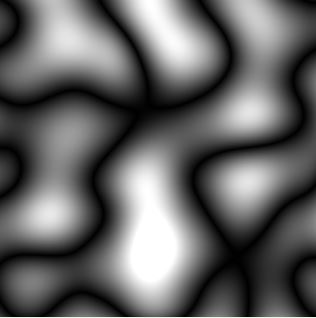
| Perlin Noise Pattern | |
<html>
<head></head>
<body>
<script>
// Define the PerlinNoise class
class PerlinNoise {
  constructor(seed) {
    this.seed = seed || 0;
    this.p = [];
    this.g2 = [];
    this.g1 = [];
    this.init();
  }

  init() {
    let r = Math.random; // new Math.seedrandom(this.seed);
    for (let i = 0; i < 256; i++) {
      this.p[i] = Math.floor(r() * 256);
      this.g1[i] = (r() * 2) - 1;
      this.g2[i] = [(r() * 2) - 1, (r() * 2) - 1];
      let len = Math.sqrt(this.g2[i][0] * this.g2[i][0] + this.g2[i][1] * this.g2[i][1]);
      this.g2[i][0] /= len;
      this.g2[i][1] /= len;
    }

    // Duplicate the permutation array to avoid boundary cases
    for (let i = 0; i < 256; i++) {
      this.p[256 + i] = this.p[i];
      this.g1[256 + i] = this.g1[i];
      this.g2[256 + i] = this.g2[i];
    }
  }

  noise(x, y) {
    let X = Math.floor(x) & 255,
      Y = Math.floor(y) & 255;
    x -= Math.floor(x);
    y -= Math.floor(y);
    let u = this.fade(x),
      v = this.fade(y);
    let A = this.p[X] + Y,
      AA = this.p[A],
      AB = this.p[A + 1],
      B = this.p[X + 1] + Y,
      BA = this.p[B],
      BB = this.p[B + 1];

    return this.lerp(v, this.lerp(u, this.grad(this.p[AA], x, y), this.grad(this.p[BA], x - 1, y)),
      this.lerp(u, this.grad(this.p[AB], x, y - 1), this.grad(this.p[BB], x - 1, y - 1)));
  }

  fade(t) {
    return t * t * t * (t * (t * 6 - 15) + 10);
  }

  lerp(t, a, b) {
    return a + t * (b - a);
  }

  grad(hash, x, y) {
    let h = hash & 7;
    let u = h < 4 ? x : y,
      v = h < 4 ? y : x;
    return ((h & 1) ? -u : u) + ((h & 2) ? -2.0 * v : 2.0 * v);
  }
}

// Main function to generate Perlin noise pattern
function PerlinNoisePattern(width, height, seed) {
  let noise = new PerlinNoise(seed);
  let pixels = new Uint8ClampedArray(width * height * 4);

  let index = 0;
  for (let y = 0; y < height; y++) {
    for (let x = 0; x < width; x++) {
      let value = noise.noise(x / 100, y / 100);
      let color = Math.abs(value) * 255; // Scale noise value to 0-255
      pixels[index++] = color; // Red
      pixels[index++] = color; // Green
      pixels[index++] = color; // Blue
      pixels[index++] = 255; // Alpha
    }
  }

  return new ImageData(pixels, width, height);
}

// Example usage
let canvas = document.createElement('canvas');
let ctx = canvas.getContext('2d');
let width = 320, height = 320;
canvas.width = width;
canvas.height = height;
let imageData = PerlinNoisePattern(width, height, 100); // Seed = 100
ctx.putImageData(imageData, 0, 0);
document.body.appendChild(canvas);
</script>
</body>
</html>
Example output would look something like:
Things to Try • Add colors (not just black and white)
• Modify the resolution (different size bubbles and distributions)
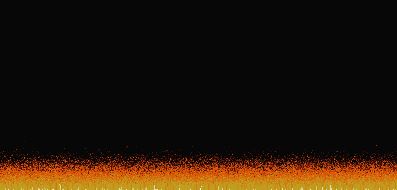
| Fire Fractal Effect (Animated) | |
<html>
<head></head>
<body>
<script>
// Define canvas properties
const canvas = document.createElement('canvas');
const ctx = canvas.getContext('2d');
const width = 400;
const height = 200;
canvas.width = width;
canvas.height = height;
document.body.appendChild(canvas);

// Define fire properties
const fireWidth = width;
const fireHeight = height;
const fireColors = ['#070707', '#1F0707', '#2F0F07', '#470F07', '#571707', '#671F07', '#771F07', '#8F2707', '#9F2F07', '#AF3F07', '#BF4707', '#C74707', '#DF4F07', '#DF5707', '#DF5707', '#D75F07', '#D75F07', '#D7670F', '#CF6F0F', '#CF770F', '#CF7F0F', '#CF8717', '#C78717', '#C78F17', '#C7971F', '#BF9F1F', '#BF9F1F', '#BF-A727', '#BF-A727', '#BF-AF2F', '#B7-AF2F', '#B7-B72F', '#B7-B737', '#CFCF6F', '#DFDF9F', '#EFEFC7', '#FFFFFF'];

// Create fire array and initialize it
let firePixels = new Array(fireWidth * fireHeight).fill(0);

// Function to initialize fire
function initFire() {
  for (let x = 0; x < fireWidth; x++) {
    firePixels[(fireHeight - 1) * fireWidth + x] = 36; // Set bottom row to maximum intensity
  }
}

// Function to update fire
function updateFire() {
  for (let x = 0; x < fireWidth; x++) {
    for (let y = 0; y < fireHeight - 1; y++) {
      let index = y * fireWidth + x;
      let belowIndex = (y + 1) * fireWidth + x;
      let decay = Math.floor(Math.random() * 3); // Random decay to create flickering effect
      let newIntensity = firePixels[belowIndex] - decay;
      if (newIntensity < 0) newIntensity = 0; // Ensure intensity does not go below zero
      firePixels[index] = newIntensity;
    }
  }
}

// Function to render fire
function renderFire() {
  for (let x = 0; x < fireWidth; x++) {
    for (let y = 0; y < fireHeight; y++) {
      let index = y * fireWidth + x;
      let intensity = firePixels[index];
      let color = fireColors[intensity];
      ctx.fillStyle = color;
      ctx.fillRect(x, (y + 1), 1, 1);
    }
  }
}

// Main loop to update and render fire
function loop() {
  updateFire();
  renderFire();
  requestAnimationFrame(loop);
}

// Initialize and start the fire effect
initFire();
loop();

</script>
</body>
</html>
Things to Try • Try other colors (e.g., blue or green fire)
• Scale the fire (so it's larger)
• Mix in some randomness so it's not so even
• Try generating a small fire, stretch (scale it up) and blur it
• Modify the speed of the animation
|
|



